
Linux程序之可变参数&&选项那些事!
来源:良许Linux教程网
时间:2025-01-22 11:22:04 359浏览 收藏
在IT行业这个发展更新速度很快的行业,只有不停止的学习,才不会被行业所淘汰。如果你是文章学习者,那么本文《Linux程序之可变参数&&选项那些事!》就很适合你!本篇内容主要包括##content_title##,希望对大家的知识积累有所帮助,助力实战开发!
一、Linux应用程序如何接收参数?
1. argc、argv
在Linux中,当我们执行应用程序时,通常会通过命令行将参数传递给程序,例如:
ls /dev/ -l
这里的 /dev/ 和 -l 都是作为参数传递给命令 ls。
那么应用程序是如何接收这些参数的呢?
一般来说,应用程序从 main 函数开始执行,传统的 main 函数定义如下:
int main(int argc, char* argv[])
在这里:
-
argc:表示程序的命令行参数数量,用于统计参数数量。 -
argv:是一个指向字符串数组的指针,数组中的每个字符串都是一个参数,而最后一个元素则为 0。常见的做法是使用多级指针来处理字符串。
char* argv[] 有时也会写成 char **argv,实际上,argv[] 是一个存放字符指针地址的数组。
在C语言中,字符串被存放在 char 数组中,而最后一个元素为 \0,表示字符串的结束。
当我们使用 printf(%s) 时,就是在输出字符串。
通常情况下,我们使用 argv 指针来访问和处理 argv[] 数组的内容。
在C语言中,数组本质上就是一个指针加上偏移量的概念。
因此,argv 实际上是一个指向 argv[] 的指针数组,无需额外定义即可直接使用。
而 argv[] 数组中存放的指针则指向输入命令的不同部分,包括调用程序、选项和参数。
2. 举例
下面我们用一个实例来理解argc和argv
/*
* argc: 命令行参数的个数
* argv: 字符指针数组(指向各个命令行参数的字符指针所构成的数组)
*/
int main(int argc, char* argv[]) // 接收命令行参数
{
 printf("argc=%d\n",argc);
    for (int i = 0; i printf("argv[%d]: %s\n", i, argv[i]); // 遍历字符指针数组argv
    }
    return 0;
}
执行结果
peng@ubuntu:~/work$ ./peng arg1 arg2 arg3
argc=4
argv[0]: ./peng
argv[1]: arg1
argv[2]: arg2
argv[3]: arg3
参数与argc,argv关系如下: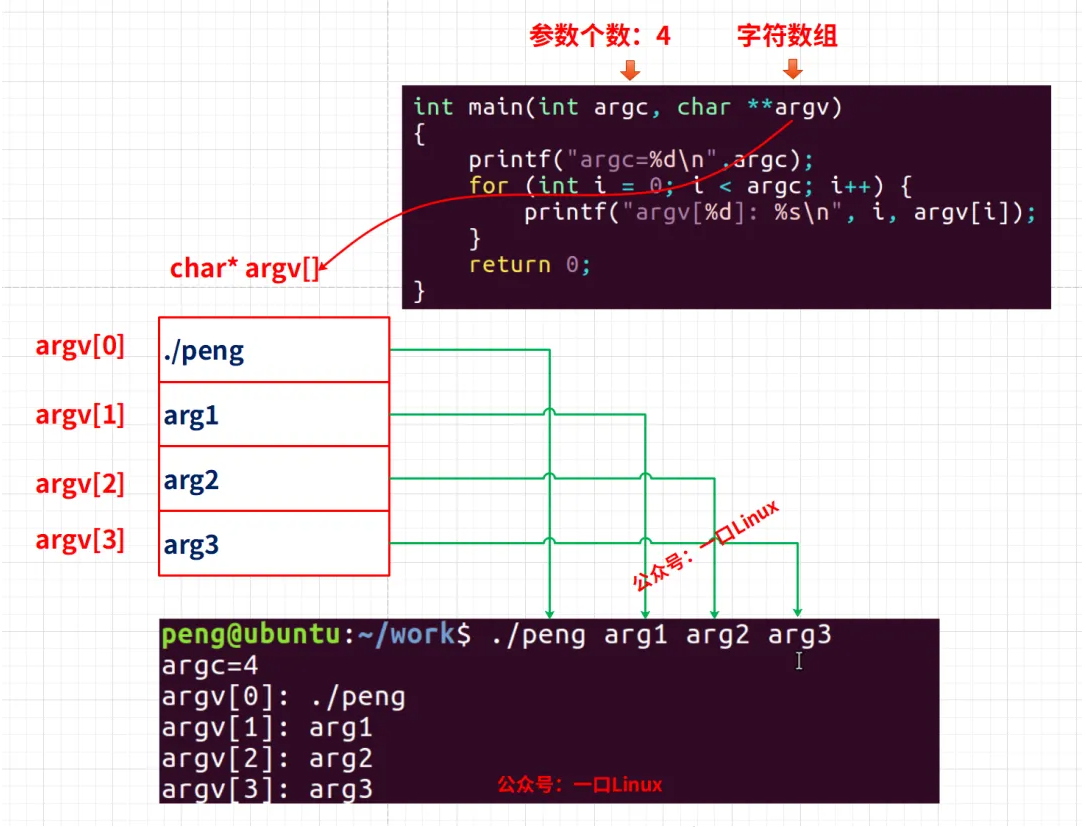
二、选项
1. 选项含义
linux程序除了上述情况以外,我们还经常会遇到一个使用方法就是选项应用,
比如:ping命令
peng@ubuntu:~/work$ ping -h
Usage: ping [-aAbBdDfhLnOqrRUvV] [-c count] [-i interval] [-I interface]
            [-m mark] [-M pmtudisc_option] [-l preload] [-p pattern] [-Q tos]
            [-s packetsize] [-S sndbuf] [-t ttl] [-T timestamp_option]
            [-w deadline] [-W timeout] [hop1 ...] destination
参数含义:
-a:尝试将IP地址解析为主机名。
-A:使用响应数据包中的附加数据。
-b:允许ping广播地址。
-B:不允许ping广播地址。
-c count:设置要发送的数据包数量。
-d:使用SO_DEBUG选项。
-D:不将socket设为分离模式。
-f:向目标发送一个“强制”数据包。
-h:显示帮助信息。
-i interval:设置发送数据包之间的时间间隔。
-I interface:设置要使用的网络接口。
-l preload:设置发送的数据包数量。
-m mark:设置ping数据包的标记。
-M pmtudisc_option:设置MTU发现选项。
-n:不要将IP地址解析为主机名。
-O:启用原始输出。
-p pattern:设置数据包的模式。
-Q tos:设置服务类型。
-r:不使用路由表,直接发送数据包到目标主机。
-R:启用记录路由。
-s packetsize:设置数据包的大小。
-S sndbuf:设置套接字的发送缓冲区大小。
-t ttl:设置数据包的TTL值。
-T timestamp_option:设置时间戳选项。
-U:使用UDP数据包。
-v:显示详细的ping命令输出。
-V:显示ping命令的版本信息。
-w deadline:设置等待响应的时间。
-W timeout:设置等待响应的超时时间。

destination:指定要ping的目标主机或IP地址。
这些 – 开头的都是选项, []表示可选的意思
[-aAbBdDfhLnOqrRUvV]    是无参的选项
[-c count] [-i interval] [-I interface]
[-m mark] [-M pmtudisc_option] [-l preload] [-p pattern] [-Q tos]
[-s packetsize] [-S sndbuf] [-t ttl] [-T timestamp_option]
[-w deadline] [-W timeout] [hop1 ...]  这些都是有参数的选项
destination   必须填写的参数
前辈们利用这点发明了“UNIX 风格”的命令,选项前面加一个横杠-,用于区分选项和参数。
2. 程序如何区分参数和选项?
在程序的代码实现中,按照 UNIX 的代码惯例,上来直接跳过第一个,然后判断指针指向的字符串第一个字符是不是-,如果是的,那么进入一个switch判断,用case列出多种支持的情况下,应该执行什么代码。
例如下面这样就可以判断选项和处理参数:
int c;
while (--argc > 0 && (*++argv)[0] == '-' {
 while (c = *++argv[0] {
  switch(c){
  case 'x':
   ...
   break;
  case 'n':
   ...
   break;
  default:
   printf("xxx: illegal opyion %c\n", c);
   ...
   break;
  }
 }
}
3. getopt、getopt_long
事实这么处理选项参数是比较麻烦的,
linux提供了选项解析的函数:
// 头文件
#include
#include          /*所在头文件 */
int getopt(intargc, char * const argv[], const char *optstring);
int getopt_long(int argc, char * const argv[], const char *optstring,
                          const struct option *longopts, int*longindex);
int getopt_long_only(int argc, char * const argv[],const char *optstring,
                          const struct option *longopts, int*longindex);
extern char *optarg;         /*系统声明的全局变量 */
extern int optind, opterr, optopt;
三、getopt
1. 定义:
int getopt(int argc, char * const argv[], const char *optstring);
功能:
 getopt是用来解析命令行选项参数的,但是只能解析短选项: **-d 100**,不能解析长选项:**--prefix**
参数
 argc:
  main()函数传递过来的参数的个数
 argv:
  main()函数传递过来的参数的字符串指针数组
 optstring:
  选项字符串,告知 getopt()可以处理哪个选项以及哪个选项需要参数
返回:
 如果选项成功找到,返回选项字母;如果所有命令行选项都解析完毕,返回 -1;
 如果遇到选项字符不在 optstring 中,返回字符 ‘?’;
 如果遇到丢失参数,那么返回值依赖于 optstring 中第一个字符,
 如果第一个字符是 ‘:’ 则返回’:‘,否则返回’?'并提示出错误信息。
2. optstring 含义 【重要】
下边重点举例说明optstring的格式意义:
char*optstring = “ab:c::”;
单个字符a         表示选项a没有参数            格式:-a即可,不加参数
单字符加冒号b:     表示选项b有且必须加参数      格式:-b 100或-b100,但-b=100错
单字符加2冒号c::   表示选项c可以有,也可以无     格式:-c200,其它格式错误
上面这个 optstring 在传入之后,getopt 函数将依次检查命令行是否指定了 -a, -b, -c(这需要多次调用 getopt 函数,直到其返回-1),当检查到上面某一个参数被指定时,函数会返回被指定的参数名称(即该字母)
系统声明的4个全局变量含义如下:
optarg —— 指向当前选项参数(如果有)的指针。 optind —— 再次调用 getopt() 时的下一个 argv指针的索引。 optopt —— 最后一个未知选项。 opterr —— 如果不希望getopt()打印出错信息,则只要将全域变量opterr设为0即可。
3. 实例
说千道万,不如来一个实例:
#include
#include
#include
int main(intargc, char *argv[])
{
    int opt;
    char *string = "a::b:c:d";
    while ((opt = getopt(argc, argv, string))!= -1)
    {
        printf("opt = %c\t\t", opt);
        printf("optarg = %s\t\t",optarg);
        printf("optind = %d\t\t",optind);
        printf("argv[optind] = %s\n",argv[optind]);
    }
}
- 正确输入参数,执行结果如下:
peng@ubuntu:~/work/test$ ./peng -a100 -b 200 -c 300 -d
opt = a  optarg = 100  optind = 2  argv[optind] = -b
opt = b  optarg = 200  optind = 4  argv[optind] = -c
opt = c  optarg = 300  optind = 6  argv[optind] = -d
opt = d  optarg = (null)  optind = 7  argv[optind] = (null)
或者
ork/test$ ./peng -a100 -b200 -c300 -d
opt = a  optarg = 100  optind = 2  argv[optind] = -b200
opt = b  optarg = 200  optind = 3  argv[optind] = -c300
opt = c  optarg = 300  optind = 4  argv[optind] = -d
opt = d  optarg = (null)  optind = 5  argv[optind] = (null)
- 输入选项参数错误的情况
peng@ubuntu:~/work/test$ ./peng -a 100 -b 200 -c 300 -d
opt = a  optarg = (null)  optind = 2  argv[optind] = 100
opt = b  optarg = 200  optind = 5  argv[optind] = -c
opt = c  optarg = 300  optind = 7  argv[optind] = -d
opt = d  optarg = (null)  optind = 8  argv[optind] = (null)
导致解析错误,第一个 optarg = null,实际输入参数 100,由于格式不正确造成的(可选参数格式固定)
- 参数丢失,也会导致错误
peng@ubuntu:~/work/test$ ./peng -a -b 200 -c
opt = a  optarg = (null)  optind = 2  argv[optind] = -b
opt = b  optarg = 200  optind = 4  argv[optind] = -c
./peng: option requires an argument -- 'c'
opt = ?  optarg = (null)  optind = 5  argv[optind] = (null)
c选项是必须有参数的
- 命令行选项未定义,-e选项未在optstring中定义,会报错:
peng@ubuntu:~/work/test$ ./peng -t
./peng: invalid option -- 't'
opt = ?  optarg = (null)  optind = 2  argv[optind] = (null)
四、getopt_long
1. 定义:
int getopt_long(int argc, char * const argv[], const char *optstring,
const struct option *longopts,int *longindex);
功能:
 包含 getopt 功能,增加了解析长选项的功能如:--prefix --help
参数:
 longopts
  指明了长参数的名称和属性
 longindex
  如果longindex非空,它指向的变量将记录当前找到参数符合longopts里的第几个元素的描述,即是 longopts 的下标值
返回:
 对于短选项,返回值同 getopt 函数;
 对于长选项,
  如果 flag 是 NULL ,返回 val ,否则返回 0 ;
 对于错误情况返回值同 getopt 函数
2. struct option
struct option {
 const char  *name;       /* 参数名称 */
 int          has_arg;    /* 指明是否带有参数 */
 int          *flag;      /* flag=NULL时,返回value;不为空时,*flag=val,返回0 */
 int          val;        /* 用于指定函数找到选项的返回值或flag非空时指定*flag的值 */
};
参数has_arg 说明: has_arg 指明是否带参数值,其数值可选:
 no_argument
  表明长选项不带参数,如:–name, --help
 required_argument
  表明长选项必须带参数,如:–prefix /root或 --prefix=/root
 optional_argument
  表明长选项的参数是可选的,如:–help或 –prefix=/root,其它都是错误
3. 实例
#include
#include
#include
int main(intargc, char *argv[])
{
    int opt;
    int digit_optind = 0;
    int option_index = 0;
    char *string = "a::b:c:d";
    static struct option long_options[] =
    {
        {"reqarg", required_argument,NULL, 'r'},
        {"optarg", optional_argument,NULL, 'o'},
        {"noarg",  no_argument,         NULL,'n'},
        {NULL,     0,                      NULL, 0},
    };
    while((opt =getopt_long_only(argc,argv,string,long_options,&option_index))!= -1)
    {
        printf("opt = %c\t\t", opt);
        printf("optarg = %s\t\t",optarg);
        printf("optind = %d\t\t",optind);
        printf("argv[optind] =%s\t\t", argv[optind]);
        printf("option_index = %d\n",option_index);
    }
}
- 正确执行命令
peng@ubuntu:~/work/test$ ./long --reqarg 100 --optarg=200 --noarg
opt = r  optarg = 100  optind = 3  argv[optind] =--optarg=200  option_index = 0
opt = o  optarg = 200  optind = 4  argv[optind] =--noarg  option_index = 1
opt = n  optarg = (null)  optind = 5  argv[optind] =(null)  option_index = 2
或者
peng@ubuntu:~/work/test$ ./long –reqarg=100 --optarg=200 --noarg
opt = o  optarg = 200  optind = 3  argv[optind] =--noarg  option_index = 1
opt = n  optarg = (null)  optind = 4  argv[optind] =(null)  option_index = 2
- 可选选项可以不给参数
peng@ubuntu:~/work/test$ ./long --reqarg 100 --optarg --noarg
opt = r  optarg = 100  optind = 3  argv[optind] =--optarg  option_index = 0
opt = o  optarg = (null)  optind = 4  argv[optind] =--noarg  option_index = 1
opt = n  optarg = (null)  optind = 5  argv[optind] =(null)  option_index = 2
- 输入长选项错误的情况
peng@ubuntu:~/work/test$ ./long --reqarg 100 --optarg 200 --noarg
opt = r  optarg = 100  optind = 3  argv[optind] =--optarg  option_index = 0
opt = o  optarg = (null)  optind = 4  argv[optind] =200  option_index = 1
opt = n  optarg = (null)  optind = 6  argv[optind] =(null)  option_index = 2
五、getopt_long_only
getopt_long_only 函数与 getopt_long 函数使用相同的参数表,在功能上基本一致
只是 getopt_long 只将 –name 当作长参数,但 getopt_long_only 会将 –name 和 -name 两种选项都当作长参数来匹配
getopt_long_only 如果选项 -name 不能在 longopts 中匹配,但能匹配一个短选项,它就会解析为短选项。
六、综合实例
下面这个例子,是一口君从开源项目ifplug提取出来的命令提取小例子,
大家可以根据自己需要,基于这个框架,定制自己的程序。
#define _GNU_SOURCE
#include
#include
#include
#include
#include
#include
#include

#define ETHCHECKD_VERSION "1.1"


int delay_up = 0;
char *interface = "eth0";


void usage(char *p) {
    if (strrchr(p, '/'))
        p = strchr(p, '/')+1;

    printf("%s [options]\n"
           "   -i --iface=IFACE          Specify ethernet interface (%s)\n"
           "   -d --delay-up=SECS        Specify delay time (%i)\n"
           "   -h --help                 Show this help\n",
           p,
           interface,
           delay_up);
}

void parse_args(int argc, char *argv[]) {
    static struct option long_options[] = {

        {"iface",                required_argument, 0, 'i'},
        {"delay-up",             required_argument, 0, 'd'},
        {"help",                 no_argument, 0, 'h'},
        {"version",              no_argument, 0, 'v'},
        {0, 0, 0, 0}
    };
    int option_index = 0;
    int help = 0, _kill = 0, _check = 0, _version = 0, _suspend = 0, _resume = 0, _info = 0;

    for (;;) {
        int c;

        if ((c = getopt_long(argc, argv, "i:d:hv", long_options, &option_index)) break;

        switch (c) {
            case 'i' :
                interface = strdup(optarg);
    printf("interface %s\n",interface);
                break;
            case 'd':
                delay_up = atoi(optarg);
    printf("delay_up %d\n",delay_up);
                break;
            case 'h':
                usage(argv[0]);
                break;
             case 'v':
                printf("peng "ETHCHECKD_VERSION"\n");
                break;
            default:
                fprintf(stderr, "Unknown parameter.\n");
                exit(1);
        }
    }

}

static volatile int alarmed = 0;

int main(int argc, char* argv[]) {

    parse_args(argc, argv);
    return 0;
}
下面是测试结果
- 短选项
peng@ubuntu:~/work/test$ ./param -h
param [options]
   -i --iface=IFACE          Specify ethernet interface (eth0)
   -d --delay-up=SECS        Specify delay time (0)
   -h --help                 Show this help
peng@ubuntu:~/work/test$ ./param -v
peng 1.1

peng@ubuntu:~/work/test$ ./param -vh
peng 1.1
param [options]
   -i --iface=IFACE          Specify ethernet interface (eth0)
   -d --delay-up=SECS        Specify delay time (0)
   -h --help                 Show this help

peng@ubuntu:~/work/test$ ./param -i eth3 -d 15
interface eth3
delay_up 15


peng@ubuntu:~/work/test$ ./param -i eth3 -d 15 -h
interface eth3
delay_up 15
param [options]
   -i --iface=IFACE          Specify ethernet interface (eth3)
   -d --delay-up=SECS        Specify delay time (15)
   -h --help                 Show this help
- 长选项
peng@ubuntu:~/work/test$ ./param --help
param [options]
   -i --iface=IFACE          Specify ethernet interface (eth0)
   -d --delay-up=SECS        Specify delay time (0)
   -h --help                 Show this help

peng@ubuntu:~/work/test$ ./param --version
peng 1.1

peng@ubuntu:~/work/test$ ./param --iface eth3 --delay-up 15
interface eth3
delay_up 15
talk is cheap!
test this code!
快操练起来吧!!!
理论要掌握,实操不能落!以上关于《Linux程序之可变参数&&选项那些事!》的详细介绍,大家都掌握了吧!如果想要继续提升自己的能力,那么就来关注golang学习网公众号吧!
-
501 收藏
-
501 收藏
-
501 收藏
-
501 收藏
-
501 收藏
-
462 收藏
-
324 收藏
-
440 收藏
-
326 收藏
-
369 收藏
-
475 收藏
-
229 收藏
-
471 收藏
-
415 收藏
-
277 收藏
-
298 收藏
-
347 收藏
-

- 前端进阶之JavaScript设计模式
- 设计模式是开发人员在软件开发过程中面临一般问题时的解决方案,代表了最佳的实践。本课程的主打内容包括JS常见设计模式以及具体应用场景,打造一站式知识长龙服务,适合有JS基础的同学学习。
- 立即学习 543次学习
-

- GO语言核心编程课程
- 本课程采用真实案例,全面具体可落地,从理论到实践,一步一步将GO核心编程技术、编程思想、底层实现融会贯通,使学习者贴近时代脉搏,做IT互联网时代的弄潮儿。
- 立即学习 516次学习
-

- 简单聊聊mysql8与网络通信
- 如有问题加微信:Le-studyg;在课程中,我们将首先介绍MySQL8的新特性,包括性能优化、安全增强、新数据类型等,帮助学生快速熟悉MySQL8的最新功能。接着,我们将深入解析MySQL的网络通信机制,包括协议、连接管理、数据传输等,让
- 立即学习 500次学习
-

- JavaScript正则表达式基础与实战
- 在任何一门编程语言中,正则表达式,都是一项重要的知识,它提供了高效的字符串匹配与捕获机制,可以极大的简化程序设计。
- 立即学习 487次学习
-

- 从零制作响应式网站—Grid布局
- 本系列教程将展示从零制作一个假想的网络科技公司官网,分为导航,轮播,关于我们,成功案例,服务流程,团队介绍,数据部分,公司动态,底部信息等内容区块。网站整体采用CSSGrid布局,支持响应式,有流畅过渡和展现动画。
- 立即学习 485次学习