
钴蓝溪流锦鲤手机壁纸如何把鱼影放到锁屏下半部
来源:17golang原创
时间:2026-09-14 23:50:41 224浏览 收藏
想做一张适合锁屏的钴蓝溪流锦鲤壁纸,关键不是把鱼放得越大越醒目,而是把时间区和主体区先分开。下面这套构图让锦鲤鱼影稳定落在屏幕下半部,上方保留安静的水面留白,锁屏时间出现后仍然看得清。
- 顶部约 35%—40% 做低细节留白,避免水纹抢走时间和状态栏的可读性。
- 主图把单条锦鲤放在下半部偏右,变体再压低主体并增加前景纵深。
- 两张图都使用 9:16、无文字、无水印设计,预览后可直接下载同一张清洁 WebP。
锁屏使用场景:先划出时间区和主体区
手机锁屏最容易出现的冲突,是锦鲤刚好顶住时间,或者水面高光让通知文字变得难读。可以把竖幅画面粗略分成三段:顶部是时间与状态栏,中部是水流过渡区,底部才是鱼体、鱼影和较强的纹理。这里不追求严格的像素线,而是让顶部 35%—40% 保持颜色连续、纹理稀疏。
主图的关键词应同时约束“单条锦鲤”“下半部偏右”和“顶部低细节”。只写“蓝色溪流里的锦鲤”,主体很容易居中,后续再裁切也会损失鱼尾。
主壁纸:让锦鲤鱼影停在锁屏下半部
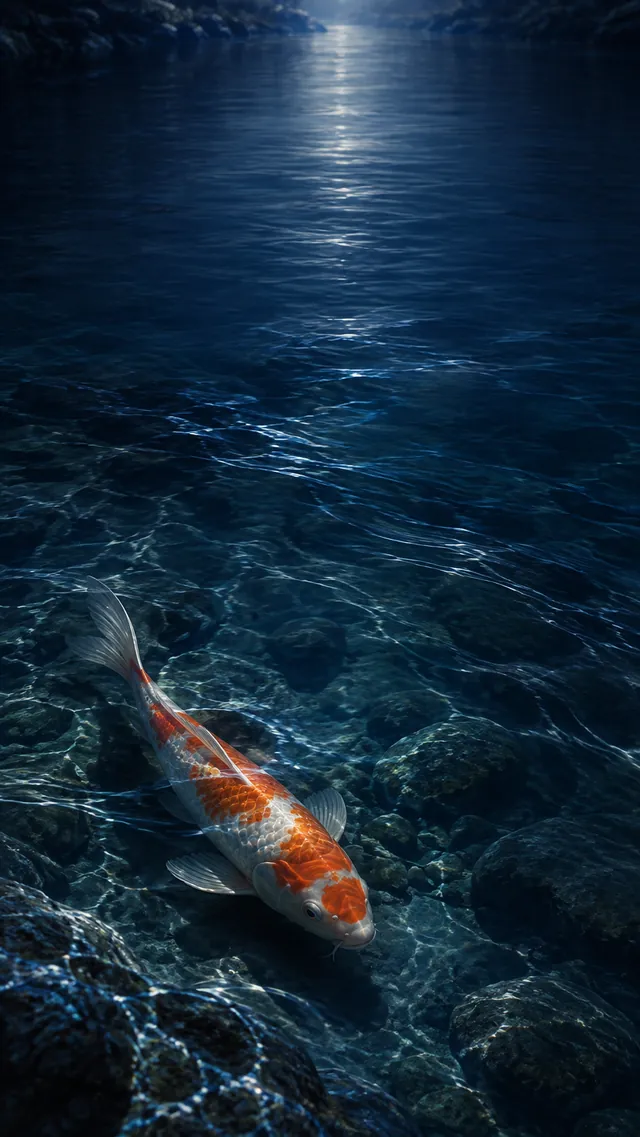
主构图选择钴蓝、午夜蓝和低饱和青色,鱼身只留下橙白暖色作为视觉锚点。把鱼放在下半部偏右,左侧留出一条水流方向,画面会有轻微的不对称,却不会像海报一样硬摆拍。
中文提示词
原创 9:16 竖幅手机锁屏壁纸,一条优雅的橙白锦鲤在钴蓝色溪流的下半部偏右缓慢游动,水下有柔和鱼影与倒影。俯视略带角度的清澈浅溪,深钴蓝和午夜蓝水面,少量淡蓝水流线,水下隐约可见平滑石块。采用高级自然主义数字绘画,真实水体折射、细腻鳞片与安静电影感。画面顶部 35% 保持低细节和安静留白,供锁屏时间与状态栏使用;锦鲤和最明显的鱼影放在下半部,保持头尾完整,不要拥挤。冷色日光穿过水面形成克制的银蓝光晕,配色为钴蓝、午夜蓝、低饱和青色,以及锦鲤身上的少量暖橙和象牙白。无文字、无 Logo、无水印、无二维码、无 App 界面、无手机边框、无版权角色、无人物;不要多条鱼、海报排版、广告文案、顶部繁杂纹理、过度霓虹、错误鱼鳍、签名或边框。
English prompt
Original 9:16 vertical phone lock-screen wallpaper, one elegant orange-and-white koi swimming slowly in the lower-right half of a cobalt-blue stream, with a soft fish shadow and reflection beneath it. A clear shallow stream viewed slightly from above, deep cobalt and midnight-blue water, a few pale-blue current lines, smooth stones barely visible under the surface. Premium naturalistic digital painting with realistic water refraction, delicate scales, and a quiet cinematic mood. Keep the top 35 percent low-detail and calm for the lock-screen clock and status bar; place the koi and strongest shadow in the lower half, keep the head and tail complete, and avoid crowding. Cool daylight passes through the water with a restrained silver-blue glow. Palette: cobalt blue, midnight blue, muted cyan, with controlled warm orange and ivory accents on the koi. No text, logo, watermark, QR code, app UI, phone frame, copyrighted character, or person; avoid multiple fish, poster layout, advertising copy, a busy clock zone, harsh neon, malformed fins, signature, or border.
留白与主体位置:用三个变量稳定复现
如果生成结果仍然把鱼推到中间,可以按下面的顺序改词,不要一次加入很多形容词。
| 变量 | 建议写法 | 调整结果 |
|---|---|---|
| 主体高度 | lower half、lower-right area | 把鱼从视觉中心移到下半部 |
| 顶部留白 | top 35 percent low-detail and calm | 减少时间区的高光和密集水纹 |
| 纵深 | foreground ripples、soft shadow beneath | 增加前景层次,同时保留鱼身轮廓 |
颜色也要克制。钴蓝水面负责统一背景,橙白只用于锦鲤;如果把暖色扩散到整片水面,锁屏图标会失去清楚的落点。预览时先叠加系统时间,再判断鱼影是否仍在下半部,而不是只看无文字的原图。
变体:把鱼影压低并增加前景纵深
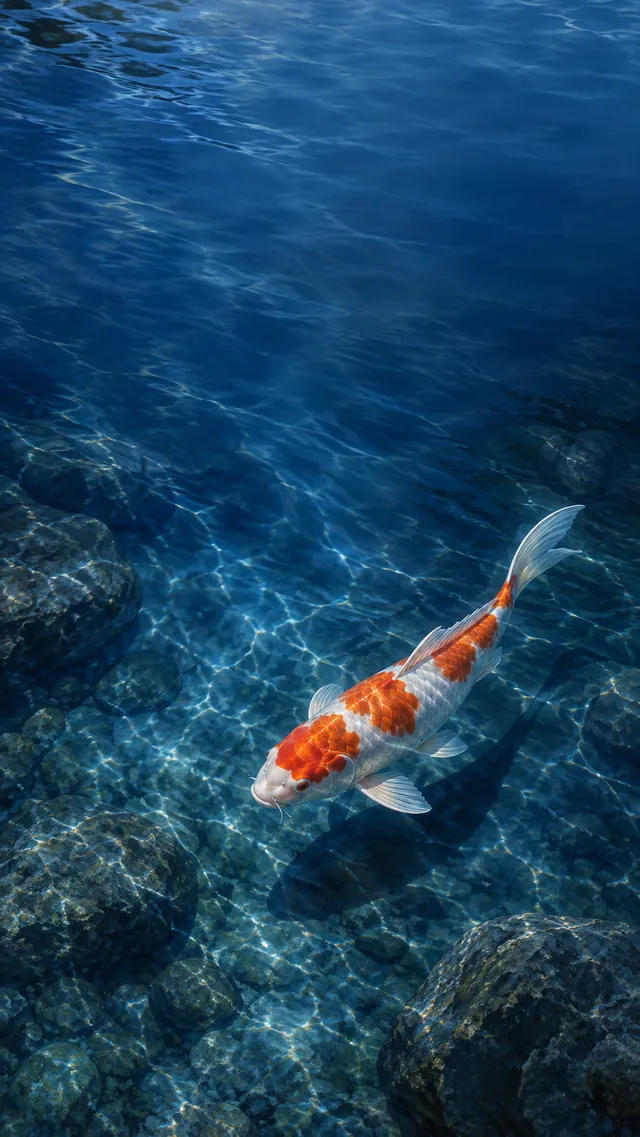
变体不换主题,只改变两个可观察的结果:锦鲤更靠近底部,前景水纹更近。这样与主图有明显差别,又保留同源的钴蓝溪流和单主体逻辑。若底部被裁掉,先删减“closer to the bottom edge”的强度,再保留 9:16 和 safe margins。
English variant prompt
Create a visibly different original 9:16 vertical lock-screen wallpaper variant: push one orange-and-white koi and its soft shadow closer to the bottom edge of a cobalt-blue stream, add stronger foreground water depth, and keep the upper lock-screen area quiet. Show a deep cobalt stream at blue hour with layered translucent water, dark-blue foreground ripples, and a narrow cool light path receding toward the upper middle. The single koi forms a gentle diagonal from lower-left toward lower-center, mostly submerged, with a longer diffused shadow. Keep the top 40 percent sparse and smooth for the clock and icons, frame the koi with foreground ripples without covering its body, and preserve safe margins and a clear silhouette. Naturalistic digital painting, cinematic underwater depth, cool moonlike reflection, restrained orange-white scale highlights. No text, logo, watermark, QR code, UI, phone frame, copyrighted character, human likeness, multiple fish, centered subject, poster design, decorative border, rainbow colors, malformed anatomy, signature, or border.
裁切建议:保存前用锁屏预览再确认
保存时优先保留 9:16 竖幅,不要为了填满屏幕把画面横向放大。先看顶部:时间是否落在连续的深蓝区域;再看底部:鱼影是否被导航区域或裁切边缘截断;最后看中部:水流是否仍然把视线从留白自然带向锦鲤。三项都满足,就可以使用对应的清洁 WebP。
常见问题
为什么锦鲤总是跑到画面中央?
把“lower half”“lower-right area”放在主体描述和构图描述中各写一次,并删掉 centered、hero shot 等可能强化中心构图的词。
顶部留白太空,怎样避免像一片纯色?
保留极淡的水流线、远处冷光和低对比纹理,但明确写“low-detail and calm”,让顶部有材质却不形成视觉焦点。
主图和变体怎样才算真正不同?
至少改变一个可核对的构图变量。这里主图是下半部偏右,变体是更靠底部并强化前景水纹,下载后能直接比较主体高度和纵深。
-
406 收藏
-
164 收藏
-
350 收藏
-
162 收藏
-
215 收藏
-
124 收藏
-
261 收藏
-
178 收藏
-
472 收藏
-
314 收藏
-
277 收藏
-
324 收藏
-
372 收藏
-
245 收藏
-
428 收藏
-
400 收藏
-
174 收藏
-
- 前端进阶之JavaScript设计模式
- 设计模式是开发人员在软件开发过程中面临一般问题时的解决方案,代表了最佳的实践。本课程的主打内容包括JS常见设计模式以及具体应用场景,打造一站式知识长龙服务,适合有JS基础的同学学习。
- 立即学习 543次学习
-

- GO语言核心编程课程
- 本课程采用真实案例,全面具体可落地,从理论到实践,一步一步将GO核心编程技术、编程思想、底层实现融会贯通,使学习者贴近时代脉搏,做IT互联网时代的弄潮儿。
- 立即学习 516次学习
-

- 简单聊聊mysql8与网络通信
- 如有问题加微信:Le-studyg;在课程中,我们将首先介绍MySQL8的新特性,包括性能优化、安全增强、新数据类型等,帮助学生快速熟悉MySQL8的最新功能。接着,我们将深入解析MySQL的网络通信机制,包括协议、连接管理、数据传输等,让
- 立即学习 500次学习
-
- JavaScript正则表达式基础与实战
- 在任何一门编程语言中,正则表达式,都是一项重要的知识,它提供了高效的字符串匹配与捕获机制,可以极大的简化程序设计。
- 立即学习 487次学习
-
- 从零制作响应式网站—Grid布局
- 本系列教程将展示从零制作一个假想的网络科技公司官网,分为导航,轮播,关于我们,成功案例,服务流程,团队介绍,数据部分,公司动态,底部信息等内容区块。网站整体采用CSSGrid布局,支持响应式,有流畅过渡和展现动画。
- 立即学习 485次学习