
Go runtime/pprof 怎样给 goroutine 添加标签
来源:17golang原创
时间:2026-10-25 20:14:14 306浏览 收藏
如果 CPU 或 goroutine profile 里只有函数名,很难回答“到底是哪类请求占用了时间”。Go 的 runtime/pprof 可以把低基数的业务标签挂到 goroutine 上,再让 profile 按标签区分任务。最常用的写法是 pprof.Labels 配合 pprof.Do:标签在回调作用域内生效,回调里新建的 goroutine 也会继承。
官方文档:https://pkg.go.dev/runtime/pprof
要给一段并发工作加标签,先创建pprof.Labels("request", "export"),再用pprof.Do(ctx, labels, func(ctx context.Context) { ... })包住任务;不要只把标签放进普通 context 就期待 profile 自动出现维度。
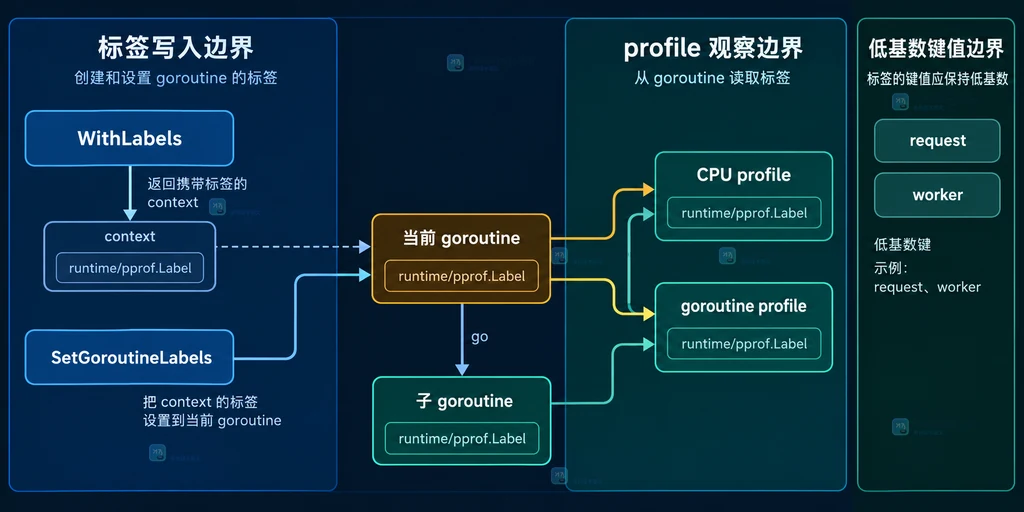
WithLabels只返回携带标签的 context,Do才适合建立作用域。SetGoroutineLabels是较底层的当前 goroutine 设置接口,新代码优先考虑Do。- 标签应使用有限的业务类型或队列名,避免把用户 ID、订单号等高基数值写进 profile。
先把“标签挂在哪里”分清
标签不是 goroutine 的普通字段,也不是日志上下文的自动别名。pprof.Labels 接收成对的字符串键和值,返回一个 LabelSet;pprof.WithLabels 则返回一个带标签的新 context.Context。这一步只是准备数据,真正让当前执行范围使用标签的是 pprof.Do 或 SetGoroutineLabels。
例如,把导出队列和请求类型作为两个稳定维度:
labels := pprof.Labels("request", "export", "queue", "high")
pprof.Do(ctx, labels, func(ctx context.Context) {
    // Do 的回调是标签作用域;回调中创建的 goroutine 会继承这些标签。
    go exportBatch(ctx)
})
用 pprof.Do 给 goroutine 建立标签作用域
Do 会把标签加入父 context 的标签集合,并在回调结束后恢复外层状态。它特别适合包住一次请求、一个队列任务或一段批处理工作。注意标签继承依赖 goroutine 的创建位置:在回调内执行 go exportBatch(ctx),子 goroutine 才能从这个上下文获得标签。
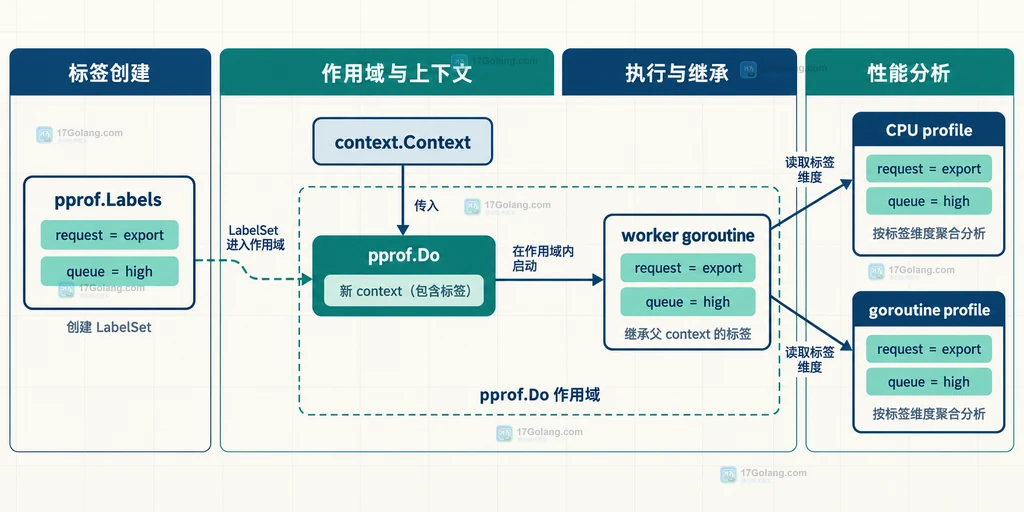
如果把 goroutine 先启动,再在另一个位置调用 Do,已经运行的 goroutine 不会被事后补上标签。实际工程里应让“创建任务”和“进入标签作用域”靠近,减少漏标。
区分 WithLabels、SetGoroutineLabels 与 pprof.Label
三个 API 的职责不同:WithLabels 生成携带标签的 context;SetGoroutineLabels 把给定 context 中的标签设置到当前 goroutine;Label 从 context 读取某个键。官方文档把 SetGoroutineLabels 定义为比 Do 更底层的接口,因此常规业务边界优先使用 Do。
func runWorker(parent context.Context) {
    ctx := pprof.WithLabels(parent, pprof.Labels("worker", "thumbnail"))
    // 只有当前 goroutine 需要直接切换标签时才使用底层接口。
    pprof.SetGoroutineLabels(ctx)

    if value, ok := pprof.Label(ctx, "worker"); ok {
        log.Printf("worker label=%s", value) // 读取 context 中的标签做辅助记录
    }
}
这里的 Label 读取的是 context,不等于从已生成的 profile 文件查询。profile 是否带有可用标签,还取决于采集的 profile 类型和查看工具对标签维度的支持;不能把日志里的字段直接当作 profile 结果。
采集后怎样检查标签是否有价值
runtime/pprof 的文档明确指出,当前只有 CPU 和 goroutine profile 使用标签信息。采集 CPU profile 后,可以用 go tool pprof 打开文件或 HTTP 数据源,再围绕标签维度观察热点;goroutine profile 更适合确认不同任务类型的堆栈分布。
# 从 HTTP pprof 端点读取 CPU profile;URL 是数据源,不是标签定义位置。
go tool pprof http://127.0.0.1:6060/debug/pprof/profile?seconds=20

# 打开已经保存的 profile,继续在 pprof 工具中查看标签维度。
go tool pprof service cpu.prof
检查时先问三个问题:标签键是否稳定、值的数量是否有限、profile 采集期间目标任务是否真的经过了 pprof.Do。如果把每个用户 ID 或请求 ID 都当值,维度会迅速膨胀,结果反而难以比较。更合适的是 request=export、queue=high 这类可聚合字段。
常见问题
只调用 WithLabels,profile 会自动带标签吗?
不应这样假设。WithLabels 返回的是带标签的 context;要让执行范围使用它,通常用 pprof.Do,或者在确实需要时调用 SetGoroutineLabels。
Do 结束后,外层 goroutine 的标签会永久改变吗?
Do 的标签只在回调作用域内加入,并在回调返回后恢复外层状态。子 goroutine 的生命周期如果超过回调,则应明确它继续使用的 context 和任务边界。
为什么标签写了却在 heap profile 中找不到?
官方文档说明标签信息当前由 CPU 和 goroutine profile 使用;heap profile 不是验证 pprof 标签的首选对象。先确认采集类型,再确认任务经过标签作用域。
-
860 收藏
-
843 收藏
-
826 收藏
-
809 收藏
-
792 收藏
-
175 收藏
-
317 收藏
-
176 收藏
-
159 收藏
-
245 收藏
-
422 收藏
-
194 收藏
-
198 收藏
-
229 收藏
-
471 收藏
-
245 收藏
-
470 收藏
-
- 前端进阶之JavaScript设计模式
- 设计模式是开发人员在软件开发过程中面临一般问题时的解决方案,代表了最佳的实践。本课程的主打内容包括JS常见设计模式以及具体应用场景,打造一站式知识长龙服务,适合有JS基础的同学学习。
- 立即学习 543次学习
-

- GO语言核心编程课程
- 本课程采用真实案例,全面具体可落地,从理论到实践,一步一步将GO核心编程技术、编程思想、底层实现融会贯通,使学习者贴近时代脉搏,做IT互联网时代的弄潮儿。
- 立即学习 516次学习
-
- 简单聊聊mysql8与网络通信
- 如有问题加微信:Le-studyg;在课程中,我们将首先介绍MySQL8的新特性,包括性能优化、安全增强、新数据类型等,帮助学生快速熟悉MySQL8的最新功能。接着,我们将深入解析MySQL的网络通信机制,包括协议、连接管理、数据传输等,让
- 立即学习 500次学习
-
- JavaScript正则表达式基础与实战
- 在任何一门编程语言中,正则表达式,都是一项重要的知识,它提供了高效的字符串匹配与捕获机制,可以极大的简化程序设计。
- 立即学习 487次学习
-

- 从零制作响应式网站—Grid布局
- 本系列教程将展示从零制作一个假想的网络科技公司官网,分为导航,轮播,关于我们,成功案例,服务流程,团队介绍,数据部分,公司动态,底部信息等内容区块。网站整体采用CSSGrid布局,支持响应式,有流畅过渡和展现动画。
- 立即学习 485次学习