
Go pprof 标签没有出现在 profile 中怎么办
来源:17golang原创
时间:2026-10-28 22:42:35 301浏览 收藏
Go pprof 标签没有出现在 profile 中,先不要急着改标签字符串。最常见的原因有三个:读取了不使用标签的 profile、只把标签放进 context 却没有让它进入当前 goroutine、或者设置标签时已经错过了 CPU 采样窗口。官方文档还明确说明,当前只有 CPU profile 和 goroutine profile 使用 labels。
官方文档:https://pkg.go.dev/runtime/pprof
先确认 profile 类型和标签作用域
pprof.WithLabels 返回的是一个新的 context,它本身不会自动修改当前 goroutine 的 profile 标签;pprof.Do 才会在回调期间设置标签,并在回调返回后恢复。另一个容易忽略的点是,heap、allocs、block、mutex 等 profile 不能按 CPU 或 goroutine profile 的方式期待标签展示。
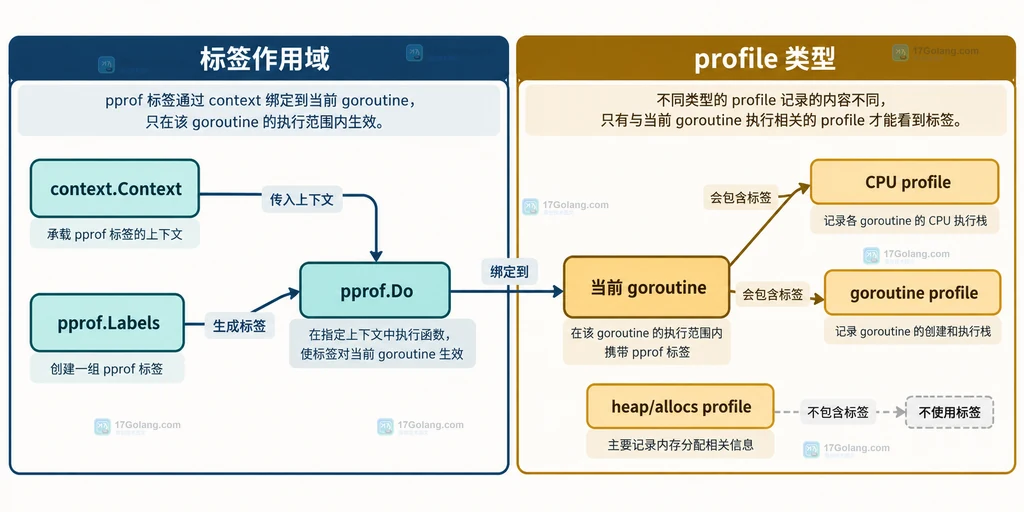
因此第一轮排查只问两件事:你拿到的是 CPU 或 goroutine profile 吗?采样发生时,带标签的代码是否真的在运行?如果答案有一个是否定的,继续调整标签 key 通常没有意义。
用 pprof.Do 建立可继承的标签边界
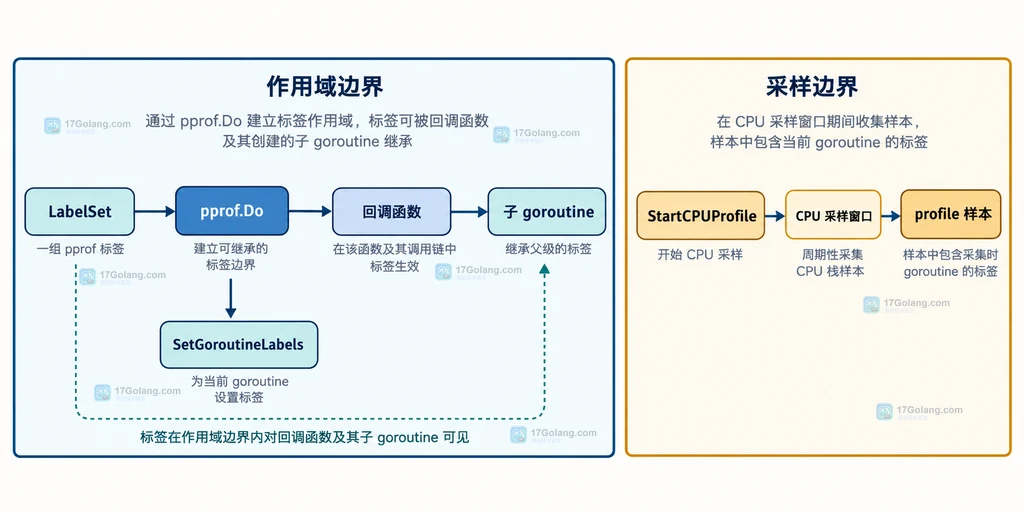
推荐把业务标签和被采样的工作放在同一个 pprof.Do 回调里。标签在回调作用域内可被当前 goroutine 使用,回调中创建的新 goroutine 也会继承这组标签。示例只展示结构,不代表已经在本机生成 profile:
package main

import (
    "context"
    "runtime/pprof"
)

func runTask(ctx context.Context) {
    labels := pprof.Labels("task", "checkout", "stage", "pricing")
    pprof.Do(ctx, labels, func(ctx context.Context) {
        // 采样期间要让真正的业务工作处于这个标签作用域内。
        go func() {
            // 新 goroutine 从创建它的 goroutine 继承 pprof 标签。
            calculatePrice(ctx)
        }()
        calculatePrice(ctx)
    })
}

func calculatePrice(ctx context.Context) {
    // 这里放被 CPU 或 goroutine profile 观察的实际工作。
    _ = ctx
}
注意,传给业务函数的 ctx 方便继续传递请求信息,但“标签是否出现在 profile 中”取决于当前 goroutine 是否处于 Do 的作用域以及 profile 类型,而不是函数参数名是否叫 ctx。
处理手动设置和采样窗口
pprof.SetGoroutineLabels 是更底层的接口,它会把当前 goroutine 的标签设置为 context 中的标签。排查旧代码时可以确认是否手动调用过它,但新代码通常优先用 pprof.Do,因为后者同时表达作用域,并处理回调结束后的恢复。
func runWithManualLabels(ctx context.Context) {
    ctx = pprof.WithLabels(ctx, pprof.Labels("task", "import"))
    // 手动接口只影响当前 goroutine;调用位置必须落在采样窗口内。
    pprof.SetGoroutineLabels(ctx)
    doImport(ctx)
}

func doImport(ctx context.Context) {
    // 这里执行需要被 CPU profile 观察的导入工作。
    _ = ctx
}
手动方式有两个边界:它不会替你给已经存在的其他 goroutine 补标签;如果 doImport 没有在 CPU 采样期间运行,profile 也不会凭空出现该标签。profile 是采样记录,不是标签注册表。
用结果现象反推缺失原因
| 现象 | 优先检查 | 处理方向 |
|---|---|---|
| 完全没有标签 | profile 类型、Do 作用域 | 先改用 CPU 或 goroutine profile,再把工作放进 Do 回调 |
| 只有部分标签 | 采样窗口和 goroutine 创建位置 | 让带标签的工作持续覆盖采样窗口,检查子 goroutine 是否在作用域内创建 |
| 出现旧标签 | 手动 SetGoroutineLabels 或复用的 goroutine | 梳理当前 goroutine 的标签恢复边界,优先改用 Do |
可以把排查顺序固定成一句话:先看 profile 类型,再看标签是否进入当前 goroutine,最后看带标签工作是否覆盖采样窗口。只要这三层都成立,标签 key/value 的问题才值得继续检查。
相关问题
为什么 WithLabels 后 profile 仍然没有标签?
因为 WithLabels 只生成带标签的 context;需要用 Do,或在明确的底层场景调用 SetGoroutineLabels,让标签进入当前 goroutine。
heap profile 能不能按 pprof 标签筛选?
不要按 CPU、goroutine profile 的语义期待它。官方 runtime/pprof 文档当前只说明 CPU 和 goroutine profile 使用 labels。
-
502 收藏
-
502 收藏
-
501 收藏
-
501 收藏
-
501 收藏
-
293 收藏
-
151 收藏
-
144 收藏
-
242 收藏
-
138 收藏
-
152 收藏
-
127 收藏
-
166 收藏
-
381 收藏
-
162 收藏
-
351 收藏
-
292 收藏
-
- 前端进阶之JavaScript设计模式
- 设计模式是开发人员在软件开发过程中面临一般问题时的解决方案,代表了最佳的实践。本课程的主打内容包括JS常见设计模式以及具体应用场景,打造一站式知识长龙服务,适合有JS基础的同学学习。
- 立即学习 543次学习
-

- GO语言核心编程课程
- 本课程采用真实案例,全面具体可落地,从理论到实践,一步一步将GO核心编程技术、编程思想、底层实现融会贯通,使学习者贴近时代脉搏,做IT互联网时代的弄潮儿。
- 立即学习 516次学习
-
- 简单聊聊mysql8与网络通信
- 如有问题加微信:Le-studyg;在课程中,我们将首先介绍MySQL8的新特性,包括性能优化、安全增强、新数据类型等,帮助学生快速熟悉MySQL8的最新功能。接着,我们将深入解析MySQL的网络通信机制,包括协议、连接管理、数据传输等,让
- 立即学习 500次学习
-
- JavaScript正则表达式基础与实战
- 在任何一门编程语言中,正则表达式,都是一项重要的知识,它提供了高效的字符串匹配与捕获机制,可以极大的简化程序设计。
- 立即学习 487次学习
-

- 从零制作响应式网站—Grid布局
- 本系列教程将展示从零制作一个假想的网络科技公司官网,分为导航,轮播,关于我们,成功案例,服务流程,团队介绍,数据部分,公司动态,底部信息等内容区块。网站整体采用CSSGrid布局,支持响应式,有流畅过渡和展现动画。
- 立即学习 485次学习