
后端Spring Boot+前端Android交互+MySQL增删查改(Java+Kotlin实现)
来源:SegmentFault
时间:2023-01-09 20:40:01 244浏览 收藏
本篇文章向大家介绍《后端Spring Boot+前端Android交互+MySQL增删查改(Java+Kotlin实现)》,主要包括MySQL、android、kotlin,具有一定的参考价值,需要的朋友可以参考一下。
1 前言&概述
这篇文章是基于这篇文章的更新,主要是更新了一些技术栈以及开发工具的版本,还有修复了一些Bug。
本文是
@Entity
@Getter
@Setter
@NoArgsConstructor
@AllArgsConstructor
public class User {
    @Id
    @GeneratedValue(strategy = GenerationType.AUTO)
    private Integer id;

    private String name;
    private String password;
}
基本的
@Repository public interface UserRepository extends CrudRepository{ boolean existsByName(String name); User findByNameAndPassword(String name,String password); }
一个需要注意的点是
@Transactional
@Service
@RequiredArgsConstructor(onConstructor = @__(@Autowired))
public class UserService {
    private final UserRepository repository;

    public boolean exists(User user){
        return repository.existsByName(user.getName());
    }

    public User findByNameAndPassword(User user){
        return repository.findByNameAndPassword(user.getName(),user.getPassword());
    }

    public boolean insert(User user){
        repository.save(user);
        return true;
    }

    public boolean update(User user){
        if(repository.findById(user.getId()).isEmpty()){
            return false;
        }
        repository.save(user);
        return true;
    }

    public boolean deleteById(int id){
        if(!repository.existsById(id)){
            return false;
        }
        repository.deleteById(id);
        return true;
    }
}
注解解释如下:
@RestController
@RequestMapping("/")
@RequiredArgsConstructor(onConstructor = @__(@Autowired))
public class UserController {
    private final UserService service;

    @PostMapping("sign/in/up")
    public ResponseBody signInUp(@RequestBody User user) {
        if (service.exists(user)) {
            User u = service.findByNameAndPassword(user);
            return new ResponseBody(u != null ? ResponseCode.SIGN_IN_SUCCESS : ResponseCode.SIGN_IN_FAILED, u != null ? u.getId() : "");
        }
        return new ResponseBody(service.insert(user) ? ResponseCode.SIGN_UP_SUCCESS : ResponseCode.SIGN_UP_FAILED, "");
    }

    @PutMapping("update")
    public ResponseBody update(@RequestBody User user) {
        return new ResponseBody(service.update(user) ? ResponseCode.UPDATE_SUCCESS : ResponseCode.UPDATE_FAILED, "");
    }

    @DeleteMapping("delete")
    public ResponseBody deleteByName(@RequestParam int id) {
        return new ResponseBody(service.deleteById(id) ? ResponseCode.DELETE_SUCCESS : ResponseCode.DELETE_FAILED, "");
    }

    @GetMapping("test")
    public String test() {
        return "test";
    }
}
注解解释如下:
@Getter
@Setter
@AllArgsConstructor
@NoArgsConstructor
public class ResponseBody {
    private int code;
    private Object data;
}
响应码:
public class ResponseCode {
    public static final int SIGN_IN_SUCCESS = 2000;
    public static final int SIGN_UP_SUCCESS = 2001;
    public static final int UPDATE_SUCCESS = 2002;
    public static final int DELETE_SUCCESS = 2003;

    public static final int SIGN_IN_FAILED = 3000;
    public static final int SIGN_UP_FAILED = 3001;
    public static final int UPDATE_FAILED = 3002;
    public static final int DELETE_FAILED = 3003;
}
3.8 配置文件
spring:
  datasource:
    username: root
    password: 123456
    url: jdbc:mysql://localhost:3306/userinfo

  jpa:
    open-in-view: false
    hibernate:
      ddl-auto: update
数据库名字以及用户名密码请根据自己需要修改,
implementation 'com.squareup.okhttp3:okhttp:4.9.0'
implementation 'com.fasterxml.jackson.core:jackson-databind:2.12.1'
implementation 'org.bouncycastle:bcprov-jdk15to18:1.68'
implementation "org.projectlombok:lombok:1.18.16"
annotationProcessor 'org.projectlombok:lombok:1.18.16'
权限:
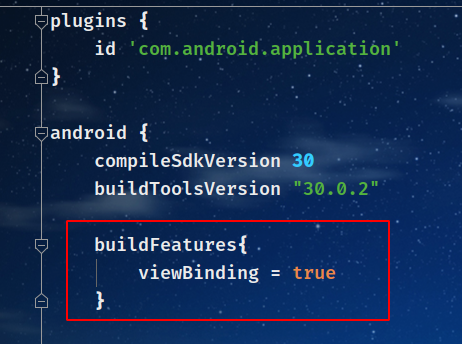
android:usesCleartextTraffic="true" 开启
buildFeatures{
    viewBinding = true
}
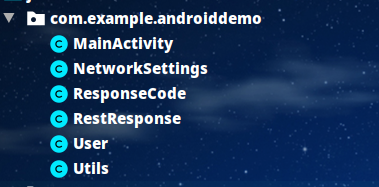
4.3 项目结构
4.4 实体类
@AllArgsConstructor
@NoArgsConstructor
@Getter
@Setter
public class User {
    private int id;
    private String name;
    private String password;

    public User(String name, String password) {
        this.name = name;
        this.password = password;
    }
}
4.5 工具类
public class Utils {
    private static final Keccak.Digest512 digest512 = new Keccak.Digest512();

    public static String encrypt(String origin) {
        return new String(Hex.encode(digest512.digest(origin.getBytes(StandardCharsets.UTF_8))));
    }

    public static String getResponseMessage(int code) {
        String message = "";
        switch (code) {
            case ResponseCode.SIGN_IN_SUCCESS:
                message = "登录成功";
                break;
            case ResponseCode.SIGN_UP_SUCCESS:
                message = "注册成功";
                break;
            case ResponseCode.SIGN_IN_FAILED:
                message = "用户名或密码错误";
                break;
            case ResponseCode.SIGN_UP_FAILED:
                message = "注册失败";
                break;
            case ResponseCode.DELETE_FAILED:
                message = "删除失败";
                break;
            case ResponseCode.DELETE_SUCCESS:
                message = "删除成功,自动退出";
                break;
            case ResponseCode.UPDATE_SUCCESS:
                message = "更新成功";
                break;
            case ResponseCode.UPDATE_FAILED:
                message = "更新失败";
                break;
            case ResponseCode.EMPTY_RESPONSE:
                message = "响应体为空";
                break;
            case ResponseCode.SERVER_ERROR:
                message = "服务器错误";
                break;
            case ResponseCode.JSON_SERIALIZATION:
                message = "JSON序列化错误";
                break;
            case ResponseCode.EXIT_SUCCESS:
                message = "退出成功";
                break;
            case ResponseCode.REQUEST_FAILED:
                message = "请求发送失败";
                break;
            case ResponseCode.UNCHANGED_INFORMATION:
                message = "未修改信息";
                break;
        }
        return message;
    }

    public static void showMessage(Context context, Message message) {
        Toast.makeText(context, getResponseMessage(message.what), Toast.LENGTH_SHORT).show();
    }
}
工具类有三个方法,分别是:
- 加密:将密码进行
@NoArgsConstructor
@Setter
@Getter
public class RestResponse {
    private int code;
    private Object data;
}
响应码:
public class ResponseCode {
    public static final int SIGN_IN_SUCCESS = 2000;
    public static final int SIGN_UP_SUCCESS = 2001;
    public static final int UPDATE_SUCCESS = 2002;
    public static final int DELETE_SUCCESS = 2003;

    public static final int SIGN_IN_FAILED = 3000;
    public static final int SIGN_UP_FAILED = 3001;
    public static final int UPDATE_FAILED = 3002;
    public static final int DELETE_FAILED = 3003;

    public static final int EMPTY_RESPONSE = 4000;
    public static final int SERVER_ERROR = 4001;
    public static final int REQUEST_FAILED = 4002;
    public static final int JSON_SERIALIZATION = 4003;
    public static final int EXIT_SUCCESS = 4004;
    public static final int UNCHANGED_INFORMATION = 4005;
}
4.7 请求
public class NetworkSettings {
    private static final String HOST = "192.168.1.8";
    private static final String PORT = "8080";
    public static final String SIGN_IN_UP = "http://"+ HOST +":"+PORT + "/sign/in/up";
    public static final String UPDATE = "http://"+ HOST +":"+PORT + "/update";
    public static final String DELETE = "http://"+ HOST +":"+PORT + "/delete";
}
4.8
public void signInUp(View view) {
    try {
        String name = binding.name.getText().toString();
        //SHA3-512加密
        String password = Utils.encrypt(binding.password.getText().toString());
        //构造OkHttp请求Request
        Request request = new Request.Builder().url(NetworkSettings.SIGN_IN_UP).post(
            //请求体类型为application/json;charset=utf-8,利用了Jackson序列化为JSON
            RequestBody.create(mapper.writeValueAsString(new User(name, password)), mediaType)
        ).build();
        //异步POST操作,传入一个Callback回调
        client.newCall(request).enqueue(new Callback() {
            //若失败
            @Override
            public void onFailure(@NotNull Call call, @NotNull IOException e) {
                //请求失败信息
                message.what = ResponseCode.REQUEST_FAILED;
                //展示对应信息,注意不能直接使用Toast.make(getApplicationContext(),"message",Toast.LENGTH_SHORT).show()
                //因为不是同一个线程,需要使用Handler提交,也就是post()方法,参数为一个线程
                handler.post(()->Utils.showMessage(getApplicationContext(),message));
                e.printStackTrace();
            }

            @Override
            public void onResponse(@NotNull Call call, @NotNull Response response) throws IOException {
                //如果成功
                if (response.isSuccessful()) {
                    //获取请求体
                    ResponseBody body = response.body();
                    //如果响应体不为空
                    if (body != null) {
                        //反序列化为响应体,包含了一个响应码以及数据字段
                        RestResponse restResponse = mapper.readValue(body.string(), RestResponse.class);
                        //设置Message
                        message.what = restResponse.getCode();
                        //如果登录成功
                        if(message.what == ResponseCode.SIGN_IN_SUCCESS){
                            handler.post(()->{
                                //存储用户id
                                signInId = (int)restResponse.getData();
                                //更新UI
                                binding.update.setVisibility(View.VISIBLE);
                                binding.delete.setVisibility(View.VISIBLE);
                                binding.signInUp.setText("退出");
                                binding.signInUp.setOnClickListener(v->signOut(false));
                                //保存旧用户名以及旧密码在更新的时候使用
                                oldName = binding.name.getText().toString();
                                oldPassword = binding.password.getText().toString();
                            });
                        }
                    } else {
                        //空响应体
                        message.what = ResponseCode.EMPTY_RESPONSE;
                        Log.e("RESPONSE_BODY_EMPTY", response.message());
                    }
                } else {
                    //服务器错误
                    message.what = ResponseCode.SERVER_ERROR;
                    Log.e("SERVER_ERROR", response.message());
                }
                //根据Message提示对应信息
                handler.post(()->Utils.showMessage(getApplicationContext(),message));
            }
        });
    } catch (JsonProcessingException e) {
        message.what = ResponseCode.JSON_SERIALIZATION;
        Utils.showMessage(getApplicationContext(),message);
        e.printStackTrace();
    }
}
这部分是登录注册的代码,还有更新用户信息以及删除用户的代码,大部分类似。
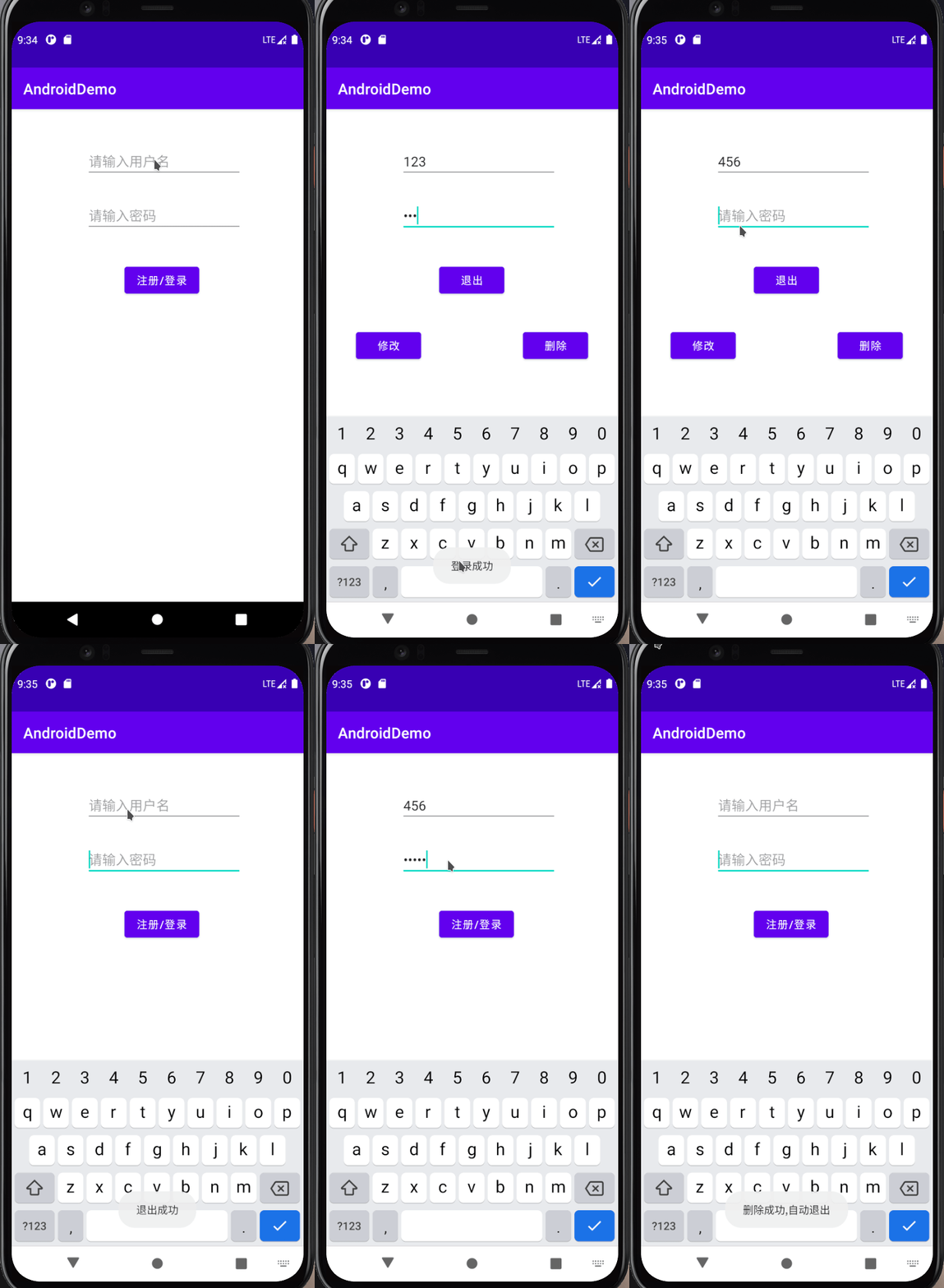
5 测试
6 注意事项
如果出现了问题或者某些功能不能正常实现可以参考此处的一些注意事项以及解决方案。
7 源码
提供了
Java
+Kotlin
两种实现:8 参考链接
今天关于《后端Spring Boot+前端Android交互+MySQL增删查改(Java+Kotlin实现)》的内容就介绍到这里了,是不是学起来一目了然!想要了解更多关于mysql的内容请关注golang学习网公众号!
- 加密:将密码进行
声明:本文转载于:SegmentFault 如有侵犯,请联系study_golang@163.com删除
相关阅读
更多>
-
374 收藏
-
140 收藏
-
394 收藏
-
321 收藏
-
306 收藏
最新阅读
更多>
课程推荐
更多>
-

- 前端进阶之JavaScript设计模式
- 设计模式是开发人员在软件开发过程中面临一般问题时的解决方案,代表了最佳的实践。本课程的主打内容包括JS常见设计模式以及具体应用场景,打造一站式知识长龙服务,适合有JS基础的同学学习。
- 立即学习 543次学习
-

- GO语言核心编程课程
- 本课程采用真实案例,全面具体可落地,从理论到实践,一步一步将GO核心编程技术、编程思想、底层实现融会贯通,使学习者贴近时代脉搏,做IT互联网时代的弄潮儿。
- 立即学习 516次学习
-

- 简单聊聊mysql8与网络通信
- 如有问题加微信:Le-studyg;在课程中,我们将首先介绍MySQL8的新特性,包括性能优化、安全增强、新数据类型等,帮助学生快速熟悉MySQL8的最新功能。接着,我们将深入解析MySQL的网络通信机制,包括协议、连接管理、数据传输等,让
- 立即学习 500次学习
-

- JavaScript正则表达式基础与实战
- 在任何一门编程语言中,正则表达式,都是一项重要的知识,它提供了高效的字符串匹配与捕获机制,可以极大的简化程序设计。
- 立即学习 487次学习
-

- 从零制作响应式网站—Grid布局
- 本系列教程将展示从零制作一个假想的网络科技公司官网,分为导航,轮播,关于我们,成功案例,服务流程,团队介绍,数据部分,公司动态,底部信息等内容区块。网站整体采用CSSGrid布局,支持响应式,有流畅过渡和展现动画。
- 立即学习 485次学习
评论列表
-

- 爱听歌的小甜瓜
- 很好,一直没懂这个问题,但其实工作中常常有遇到...不过今天到这,帮助很大,总算是懂了,感谢老哥分享文章内容!
- 2023-01-10 20:56:02
-
- 幸福的野狼
- 这篇技术贴出现的刚刚好,太全面了,很好,已收藏,关注老哥了!希望老哥能多写数据库相关的文章。
- 2023-01-10 14:14:20