
Springboot整合quartz实现定时任务的动态加载
来源:SegmentFault
时间:2023-02-25 08:01:12 341浏览 收藏
IT行业相对于一般传统行业,发展更新速度更快,一旦停止了学习,很快就会被行业所淘汰。所以我们需要踏踏实实的不断学习,精进自己的技术,尤其是初学者。今天golang学习网给大家整理了《Springboot整合quartz实现定时任务的动态加载》,聊聊MySQL、Java、springboot、quartz,我们一起来看看吧!
Springboot整合quartz实现定时任务的动态加载
Springboot整合quartz,实现动态定时任务的加载,不需要重启程序,就可以堆定时任务进行添加,停止,删除,重启等一系列操作,通过mysql数据库对定时任务进行配置。
目录结构
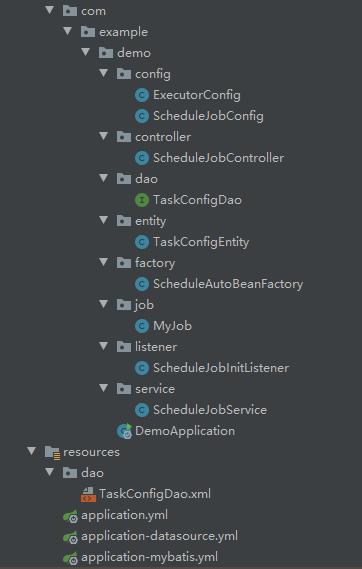
1.数据库
创建数据库配置表,用于存放定时任务的相关配置
CREATE TABLE `task_config`  (
  `id` int UNSIGNED NOT NULL AUTO_INCREMENT,
  `task_id` varchar(8) CHARACTER SET utf8mb4 COLLATE utf8mb4_0900_ai_ci NOT NULL COMMENT '任务id',
  `cron` varchar(20) CHARACTER SET utf8mb4 COLLATE utf8mb4_0900_ai_ci NOT NULL COMMENT 'cron表达式',
  `class_name` varchar(255) CHARACTER SET utf8mb4 COLLATE utf8mb4_0900_ai_ci NOT NULL COMMENT 'job引用地址',
  `description` varchar(255) CHARACTER SET utf8mb4 COLLATE utf8mb4_0900_ai_ci NOT NULL COMMENT '描述',
  `status` tinyint NOT NULL COMMENT '定时任务状态 0 停用,1启用',
  PRIMARY KEY (`id`) USING BTREE
) ENGINE = InnoDB CHARACTER SET = utf8mb4 COLLATE = utf8mb4_0900_ai_ci ROW_FORMAT = Dynamic;

SET FOREIGN_KEY_CHECKS = 1;
2.导包
org.projectlombok lombok 1.16.18 provided org.springframework.boot spring-boot-starter-quartz 2.0.4.RELEASE com.baomidou mybatis-plus-boot-starter 3.4.0 com.alibaba druid 1.1.9 mysql mysql-connector-java 8.0.17 org.springframework.boot spring-boot-starter org.springframework.boot spring-boot-starter-web
3.Springboot启动配置
1.数据源的配置
spring:
  datasource:
    driver-class-name: com.mysql.jdbc.Driver
    url: jdbc:mysql://127.0.0.1:3306/test?characterEncoding=utf8&useSSL=true&useSSL=false&allowMultiQueries=true&serverTimezone=UTC
    username: root
    password: 123456
    type: com.alibaba.druid.pool.DruidDataSource
注:mysql的版本不同,先用
mybatis-plus:
    #扫描xml的位置
  mapper-locations: classpath*:/dao/*.xml
  configuration:
    # 这个配置会将执行的sql打印出来,在开发或测试的时候可以用
    log-impl: org.apache.ibatis.logging.stdout.StdOutImpl
3.Spring的配置
spring:
  application:
    name: schedule-server
  profiles:
      #配置激活配置文件,application-mybatis,application-datasource
    active: datasource,mybatis
server:
  port: 9000
4.mybatis层
1.创建数据库表对应的实体
import com.baomidou.mybatisplus.annotation.IdType;
import com.baomidou.mybatisplus.annotation.TableField;
import com.baomidou.mybatisplus.annotation.TableId;
import com.baomidou.mybatisplus.annotation.TableName;
import lombok.Data;
import lombok.experimental.Accessors;

import java.io.Serializable;

@Data
@Accessors(chain = true)
@TableName("task_config")
public class TaskConfigEntity implements Serializable {

    @TableId(value = "id",type = IdType.AUTO)
    private Integer id;

    @TableField("task_id")
    private String taskId;

    @TableField("cron")
    private String cron;

    @TableField("class_name")
    private String className;

    @TableField("description")
    private String description;

    @TableField("status")
    private Integer status;
}
2.dao接口
同时创建dao接口
import com.baomidou.mybatisplus.core.mapper.BaseMapper; import com.example.demo.entity.TaskConfigEntity; import org.apache.ibatis.annotations.Mapper; @Mapper public interface TaskConfigDao extends BaseMapper{ }
3.xml文件
在resource资源包下创建
4.扫描dao接口
package com.example.demo;

import org.mybatis.spring.annotation.MapperScan;
import org.springframework.boot.SpringApplication;
import org.springframework.boot.autoconfigure.SpringBootApplication;

@SpringBootApplication
//扫描路径
@MapperScan("com.example.demo.dao")
public class DemoApplication {

    public static void main(String[] args) {
        SpringApplication.run(DemoApplication.class, args);
    }

}
5.线程池的创建
创建线程池用于运行定时任务
package com.example.demo.config;

import org.springframework.context.annotation.Bean;
import org.springframework.context.annotation.Configuration;
import org.springframework.scheduling.concurrent.ThreadPoolTaskExecutor;

import java.util.concurrent.Executor;
import java.util.concurrent.ThreadPoolExecutor;
import java.util.concurrent.TimeUnit;

@Configuration
public class ExecutorConfig {
    @Bean(name = "taskExecutor")
    public Executor getAsyncExecutor() throws InterruptedException{
        ThreadPoolTaskExecutor executor = new ThreadPoolTaskExecutor();
        executor.setCorePoolSize(2);
        executor.setMaxPoolSize(1024);
        executor.setKeepAliveSeconds(4);
        executor.setQueueCapacity(0);
        executor.setRejectedExecutionHandler((Runnable r, ThreadPoolExecutor exe) -> {
            // 利用BlockingQueue的特性,任务队列满时等待放入
            try {
                if (!exe.getQueue().offer(r, 30, TimeUnit.SECONDS)) {
                    throw new Exception("Task offer failed after 30 sec");
                }
            } catch (Exception e) {
                e.printStackTrace();
            }
        });
        return executor;
    }
}
6.quartz相关配置
1.自动注入工厂创建
注:只有有这个配置,quartz才可以使用自动注入,不然quartz无法使用Autowired等。
package com.example.demo.factory;

import org.quartz.spi.TriggerFiredBundle;
import org.springframework.beans.factory.config.AutowireCapableBeanFactory;
import org.springframework.context.ApplicationContext;
import org.springframework.context.ApplicationContextAware;
import org.springframework.scheduling.quartz.SpringBeanJobFactory;
import org.springframework.stereotype.Component;

/**
 * 当配置这个config后,quartz才可以使用autowired注入
 */
@Component
public class ScheduleAutoBeanFactory extends SpringBeanJobFactory implements ApplicationContextAware {
    private transient AutowireCapableBeanFactory beanFactory;
    @Override
    public void setApplicationContext(final ApplicationContext context) {
        beanFactory = context.getAutowireCapableBeanFactory();
    }
    @Override
    protected Object createJobInstance(final TriggerFiredBundle bundle) throws Exception {
        final Object job = super.createJobInstance(bundle);
        beanFactory.autowireBean(job);
        return job;
    }
}
2.quartz配置
package com.example.demo.config;

import org.quartz.Scheduler;
import org.quartz.spi.JobFactory;
import org.springframework.beans.factory.annotation.Qualifier;
import org.springframework.context.annotation.Bean;
import org.springframework.context.annotation.Configuration;
import org.springframework.scheduling.quartz.SchedulerFactoryBean;

import javax.annotation.Resource;
import java.util.concurrent.Executor;

@Configuration
public class ScheduleJobConfig {

    @Resource(name = "taskExecutor")
    private Executor taskExecutor;

    @Bean("schedulerFactoryBean")
    public SchedulerFactoryBean createFactoryBean(JobFactory jobFactory){
        SchedulerFactoryBean factoryBean = new SchedulerFactoryBean();
        factoryBean.setJobFactory(jobFactory);
        factoryBean.setTaskExecutor(taskExecutor);
        factoryBean.setOverwriteExistingJobs(true);
        return factoryBean;
    }
    //通过这个类对定时任务进行操作
    @Bean
    public Scheduler scheduler(@Qualifier("schedulerFactoryBean") SchedulerFactoryBean factoryBean) {
        return factoryBean.getScheduler();
    }
}
7.quartz功能的实现
1.基本功能
package com.example.demo.service;

import com.baomidou.mybatisplus.core.toolkit.Wrappers;
import com.example.demo.dao.TaskConfigDao;
import com.example.demo.entity.TaskConfigEntity;
import lombok.extern.log4j.Log4j2;
import org.quartz.*;
import org.springframework.beans.factory.annotation.Autowired;
import org.springframework.stereotype.Component;

import java.util.List;

@Component
@Log4j2
public class ScheduleJobService {

    @Autowired
    private TaskConfigDao taskConfigDao;

    @Autowired
    private Scheduler scheduler;

    /**
     * 程序启动开始加载定时任务
     */
    public void startJob(){
        List taskConfigEntities = taskConfigDao.selectList(
                Wrappers.lambdaQuery()
                        .eq(TaskConfigEntity::getStatus, 1));
        if (taskConfigEntities == null || taskConfigEntities.size() == 0){
            log.error("定时任务加载数据为空");
            return;
        }
        for (TaskConfigEntity configEntity : taskConfigEntities) {
            CronTrigger cronTrigger = null;
            JobDetail jobDetail = null;
            try {
                cronTrigger = getCronTrigger(configEntity);
                jobDetail = getJobDetail(configEntity);
                scheduler.scheduleJob(jobDetail,cronTrigger);
                log.info("编号:{}定时任务加载成功",configEntity.getTaskId());
            }catch (Exception e){
                log.error("编号:{}定时任务加载失败",configEntity.getTaskId());
            }

        }
        try {
            scheduler.start();
        } catch (SchedulerException e) {
            log.error("定时任务启动失败",e);
        }
    }

    /**
     * 停止任务
     * @param taskId
     */
    public void stopJob(String taskId) throws SchedulerException {
        scheduler.pauseJob(JobKey.jobKey(taskId));
    }

    /**
     * 恢复任务
     * @param taskId
     * @throws SchedulerException
     */
    public void resumeJob(String taskId) throws SchedulerException {
        scheduler.resumeJob(JobKey.jobKey(taskId));
    }

    /**
     * 添加新的job
     * @param taskId
     * @throws SchedulerConfigException
     */
    public void loadJob(String taskId) throws SchedulerConfigException {
        TaskConfigEntity taskConfigEntity = taskConfigDao.selectOne(
                Wrappers.lambdaQuery()
                        .eq(TaskConfigEntity::getTaskId, taskId)
                        .eq(TaskConfigEntity::getStatus, 1));
        if (taskConfigEntity == null){
            throw new SchedulerConfigException("未找到相关Job配置");
        }
        try {
            JobDetail jobDetail = getJobDetail(taskConfigEntity);
            CronTrigger cronTrigger = getCronTrigger(taskConfigEntity);
            scheduler.scheduleJob(jobDetail, cronTrigger);
        } catch (Exception e) {
            log.error("加载定时任务异常",e);
            throw new SchedulerConfigException("加载定时任务异常", e);
        }
    }
    public void unloadJob(String taskId) throws SchedulerException {
        // 停止触发器
        scheduler.pauseTrigger(TriggerKey.triggerKey(taskId));
        // 卸载定时任务
        scheduler.unscheduleJob(TriggerKey.triggerKey(taskId));
        // 删除原来的job
        scheduler.deleteJob(JobKey.jobKey(taskId));
    }

    /**
     * 重新加载执行计划
     * @throws Exception
     */
    public void reload(String taskId) throws Exception {
        TaskConfigEntity taskConfigEntity = taskConfigDao.selectOne(
                Wrappers.lambdaQuery()
                        .eq(TaskConfigEntity::getTaskId, taskId)
                        .eq(TaskConfigEntity::getStatus, 1));

        String jobCode = taskConfigEntity.getTaskId();
        // 获取以前的触发器
        TriggerKey triggerKey = TriggerKey.triggerKey(jobCode);
        // 停止触发器
        scheduler.pauseTrigger(triggerKey);
        // 删除触发器
        scheduler.unscheduleJob(triggerKey);
        // 删除原来的job
        scheduler.deleteJob(JobKey.jobKey(jobCode));

        JobDetail jobDetail = getJobDetail(taskConfigEntity);
        CronTrigger cronTrigger = getCronTrigger(taskConfigEntity);
        // 重新加载job
        scheduler.scheduleJob(jobDetail, cronTrigger);
    }
    //组装JobDetail
    private JobDetail getJobDetail(TaskConfigEntity configEntity) throws ClassNotFoundException {

        Class extends Job> aClass = Class.forName(configEntity.getClassName()).asSubclass(Job.class);

        return JobBuilder.newJob()
                .withIdentity(JobKey.jobKey(configEntity.getTaskId()))
                .withDescription(configEntity.getDescription())
                .ofType(aClass).build();
    }
    //组装CronTrigger
    private CronTrigger getCronTrigger(TaskConfigEntity configEntity){
        CronTrigger cronTrigger = null;
        CronScheduleBuilder cronScheduleBuilder = CronScheduleBuilder.cronSchedule(configEntity.getCron());
        cronTrigger = TriggerBuilder.newTrigger()
                .withIdentity(TriggerKey.triggerKey(configEntity.getTaskId()))
                .withSchedule(cronScheduleBuilder)
                .build();
        return cronTrigger;
    }
}
2.任务启动自动加载定时任务
package com.example.demo.listener;

import com.example.demo.service.ScheduleJobService;
import org.springframework.beans.factory.annotation.Autowired;
import org.springframework.boot.CommandLineRunner;
import org.springframework.stereotype.Component;

/**
 * 监听容器启动,并开始从数据库加载定时任务
 */
@Component
public class ScheduleJobInitListener implements CommandLineRunner {

    @Autowired
    private ScheduleJobService jobService;

    @Override
    public void run(String... strings) throws Exception {
        jobService.startJob();
    }
}
3.通过远程请求加载定时任务
package com.example.demo.controller;

import com.example.demo.service.ScheduleJobService;
import org.quartz.SchedulerConfigException;
import org.quartz.SchedulerException;
import org.springframework.beans.factory.annotation.Autowired;
import org.springframework.web.bind.annotation.GetMapping;
import org.springframework.web.bind.annotation.PathVariable;
import org.springframework.web.bind.annotation.RestController;

@RestController
public class ScheduleJobController {
    @Autowired
    private ScheduleJobService jobService;

    @GetMapping("/load/{taskId}")
    public String loadJob(@PathVariable("taskId") String taskId){
        try {
            jobService.loadJob(taskId);
        } catch (SchedulerConfigException e) {
            return "导入定时任务失败";
        }
        return "成功";
    }
    @GetMapping("/resume/{taskId}")
    public String resumeJob(@PathVariable("taskId") String taskId){
        try {
            jobService.resumeJob(taskId);
        }catch (SchedulerException e) {
            return "恢复定时任务失败";
        }
        return "成功";
    }
    @GetMapping("/stop/{taskId}")
    public String stopJob(@PathVariable("taskId") String taskId){
        try {
            jobService.stopJob(taskId);
        }catch (SchedulerException e) {
            return "暂停定时任务失败";
        }
        return "成功";
    }
    @GetMapping("/unload/{taskId}")
    public String unloadJob(@PathVariable("taskId") String taskId){
        try {
            jobService.unloadJob(taskId);
        }catch (SchedulerException e) {
            return "卸载定时任务失败";
        }
        return "成功";
    }
}
8.定时任务
package com.example.demo.job;

import org.quartz.Job;
import org.quartz.JobExecutionContext;
import org.quartz.JobExecutionException;

import java.time.LocalDateTime;
import java.time.format.DateTimeFormatter;

public class MyJob implements Job {
    @Override
    public void execute(JobExecutionContext jobExecutionContext) throws JobExecutionException {
        LocalDateTime now = LocalDateTime.now();
        System.out.println("定时任务开始"+now.format(DateTimeFormatter.ofPattern("HH:mm:ss")));
    }
}
通过实现Job接口,然后配置到数据库,就可以实现动态加载。
9.测试
1.向数据库插入一条定时任务的配置。
其中class_name为我们实现的Job的引用路径
INSERT INTO `test`.`task_config` (`id`, `task_id`, `cron`, `class_name`, `description`, `status`) VALUES ('1', 'TB00001', '0 * * * * ?', 'com.example.demo.job.MyJob', '每一分钟触发一次', '1');
2.启动框架

我配置的是一分钟执行一次
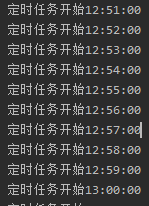
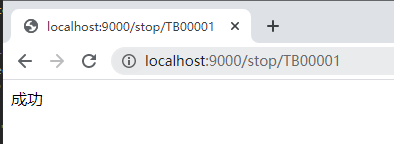
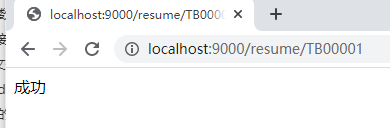
3.通过网络请求
可以通过浏览器访问地址,操作定时任务。
以上就是《Springboot整合quartz实现定时任务的动态加载》的详细内容,更多关于mysql的资料请关注golang学习网公众号!
声明:本文转载于:SegmentFault 如有侵犯,请联系study_golang@163.com删除
相关阅读
更多>
-
374 收藏
-
499 收藏
-
384 收藏
-
184 收藏
-
265 收藏
最新阅读
更多>
-
158 收藏
-
444 收藏
-
488 收藏
-
239 收藏
-
214 收藏
-
466 收藏
-
数据库 · MySQL | 7小时前 | MySQL · 执行计划 · 查询优化 · 分区表 · mysql partition pruning 分区裁剪 RANGE COLUMNS EXPLAIN partitions124 收藏
-
451 收藏
-
332 收藏
-
498 收藏
-
406 收藏
-
303 收藏
课程推荐
更多>
-

- 前端进阶之JavaScript设计模式
- 设计模式是开发人员在软件开发过程中面临一般问题时的解决方案,代表了最佳的实践。本课程的主打内容包括JS常见设计模式以及具体应用场景,打造一站式知识长龙服务,适合有JS基础的同学学习。
- 立即学习 543次学习
-

- GO语言核心编程课程
- 本课程采用真实案例,全面具体可落地,从理论到实践,一步一步将GO核心编程技术、编程思想、底层实现融会贯通,使学习者贴近时代脉搏,做IT互联网时代的弄潮儿。
- 立即学习 516次学习
-

- 简单聊聊mysql8与网络通信
- 如有问题加微信:Le-studyg;在课程中,我们将首先介绍MySQL8的新特性,包括性能优化、安全增强、新数据类型等,帮助学生快速熟悉MySQL8的最新功能。接着,我们将深入解析MySQL的网络通信机制,包括协议、连接管理、数据传输等,让
- 立即学习 500次学习
-

- JavaScript正则表达式基础与实战
- 在任何一门编程语言中,正则表达式,都是一项重要的知识,它提供了高效的字符串匹配与捕获机制,可以极大的简化程序设计。
- 立即学习 487次学习
-

- 从零制作响应式网站—Grid布局
- 本系列教程将展示从零制作一个假想的网络科技公司官网,分为导航,轮播,关于我们,成功案例,服务流程,团队介绍,数据部分,公司动态,底部信息等内容区块。网站整体采用CSSGrid布局,支持响应式,有流畅过渡和展现动画。
- 立即学习 485次学习