
SpringBoot整合MybatisPlus的简单教程(简单整合)
来源:SegmentFault
时间:2023-01-26 15:07:24 417浏览 收藏
来到golang学习网的大家,相信都是编程学习爱好者,希望在这里学习数据库相关编程知识。下面本篇文章就来带大家聊聊《SpringBoot整合MybatisPlus的简单教程(简单整合)》,介绍一下MySQL、Windows、Java、spring、intellij-idea,希望对大家的知识积累有所帮助,助力实战开发!
最近在研究springboot,顺便就会看看数据库连接这一块的知识 ,所以当我发现有通用Mapper和MybatisPlus这两款网络上比较火的简化mybatis开发的优秀软件之后。就都想试一下,看看哪一款比较适合自己。
- 先创建一个springboot的项目,可以参考我之前的文章Spring Boot 的简单教程(一) Spring Boot 项目的创建。
- 创建好springboot之后就需要整合mybatis和mybatis-plus了。
打开pom.xml文件,将最新的mybatis相关的包都引用进来。
mysql mysql-connector-java runtime org.projectlombok lombok true com.baomidou mybatis-plus-boot-starter 3.1.1 com.baomidou mybatis-plus-generator 3.1.1 org.freemarker freemarker 2.3.28
- 需要对application.yml进行相关的配置。
    #端口号
    server:
      port: 8088
    #数据库的配置信息
    spring:
      datasource:
        url: jdbc:mysql://localhost:3306/*** #自己的数据库名称
        username: root
        password: 123456
    mybatis:
      #开启驼峰命名法
      configuration:
        map-underscore-to-camel-case: true
    mybatis-plus:
      # xml地址
      mapper-locations: classpath:mapper/*Mapper.xml
      # 实体扫描,多个package用逗号或者分号分隔
      type-aliases-package: ***   #自己的实体类地址
      configuration:
        # 这个配置会将执行的sql打印出来,在开发或测试的时候可以用
        log-impl: org.apache.ibatis.logging.stdout.StdOutImpl
- 自动生成模块的方法,在相应的位置上添加上自己的一些包名就可以运行生成相应的Entity、Mapper、Mapper XML、Service、Controller 等各个模块的代码。
public class CodeGenerator {

    /**
     *
     * 读取控制台内容
     *
     */
    public static String scanner(String tip) {
        Scanner scanner = new Scanner(System.in);
        StringBuilder help = new StringBuilder();
        help.append("请输入" + tip + ":");
        System.out.println(help.toString());
        if (scanner.hasNext()) {
            String ipt = scanner.next();
            if (StringUtils.isNotEmpty(ipt)) {
                return ipt;
            }
        }
        throw new MybatisPlusException("请输入正确的" + tip + "!");
    }

    public static void main(String[] args) {
        // 代码生成器
        AutoGenerator mpg = new AutoGenerator();
        // 全局配置
        GlobalConfig gc = new GlobalConfig();
        String projectPath = System.getProperty("user.dir");
        gc.setOutputDir(projectPath + "/src/main/java");
        gc.setAuthor("jobob");
        gc.setOpen(false);
        // gc.setSwagger2(true); 实体属性 Swagger2 注解
        mpg.setGlobalConfig(gc);

        // 数据源配置
        DataSourceConfig dsc = new DataSourceConfig();
        dsc.setUrl("jdbc:mysql://localhost:3306/***?useUnicode=true&useSSL=false&characterEncoding=utf8");
        // dsc.setSchemaName("public");
        dsc.setDriverName("com.mysql.cj.jdbc.Driver");
        dsc.setUsername("root");
        dsc.setPassword("***");
        mpg.setDataSource(dsc);

        // 包配置
        PackageConfig pc = new PackageConfig();
        //这里有个模块名的配置,可以注释掉不用。
//        pc.setModuleName(scanner("模块名"));
        pc.setParent("com.zhouxiaoxi.www");
        mpg.setPackageInfo(pc);

        // 自定义配置
        InjectionConfig cfg = new InjectionConfig() {
            @Override
            public void initMap() {
                // to do nothing
            }
        };

        // 如果模板引擎是 freemarker
        String templatePath = "/templates/mapper.xml.ftl";
        // 如果模板引擎是 velocity
//         String templatePath = "/templates/mapper.xml.vm";

        // 自定义输出配置
        List focList = new ArrayList();
        // 自定义配置会被优先输出
        focList.add(new FileOutConfig(templatePath) {
            @Override
            public String outputFile(TableInfo tableInfo) {
                // 自定义输出文件名 , 如果你 Entity 设置了前后缀、此处注意 xml 的名称会跟着发生变化!!
                return projectPath + "/src/main/resources/mapper/"
//                        +  + pc.getModuleName() + 如果放开上面的模块名,这里就有一个模块名了
                        + "/" + tableInfo.getEntityName() + "Mapper" + StringPool.DOT_XML;
            }
        });
        /*
        cfg.setFileCreate(new IFileCreate() {
            @Override
            public boolean isCreate(ConfigBuilder configBuilder, FileType fileType, String filePath) {
                // 判断自定义文件夹是否需要创建
                checkDir("调用默认方法创建的目录");
                return false;
            }
        });
        */
        cfg.setFileOutConfigList(focList);
        mpg.setCfg(cfg);

        // 配置模板
        TemplateConfig templateConfig = new TemplateConfig();

        // 配置自定义输出模板
        //指定自定义模板路径,注意不要带上.ftl/.vm, 会根据使用的模板引擎自动识别
        // templateConfig.setEntity("templates/entity2.java");
        // templateConfig.setService();
        // templateConfig.setController();

        templateConfig.setXml(null);
        mpg.setTemplate(templateConfig);

        // 策略配置
        StrategyConfig strategy = new StrategyConfig();
        //数据库表映射到实体的明明策略
        strategy.setNaming(NamingStrategy.underline_to_camel);
        //数据库表字段映射到实体的命名策略, 未指定按照 naming 执行
        strategy.setColumnNaming(NamingStrategy.underline_to_camel);
        //自定义继承的Entity类全称,带包名
//        strategy.setSuperEntityClass("***");
        strategy.setEntityLombokModel(true);
        strategy.setRestControllerStyle(true);
        //自定义继承的Controller类全称,带包名
//        strategy.setSuperControllerClass("***");
        strategy.setInclude(scanner("表名,多个英文逗号分割").split(","));
        //自定义基础的Entity类,公共字段(可添加更多)
//        strategy.setSuperEntityColumns("id");
        //驼峰转连字符
        strategy.setControllerMappingHyphenStyle(true);
        //表前缀
//        strategy.setTablePrefix(pc.getModuleName() + "_");
        mpg.setStrategy(strategy);
        mpg.setTemplateEngine(new FreemarkerTemplateEngine());
        mpg.execute();
    }

}
- 在生成的controller里面添加对应的方法启动就可以正常进行访问了。
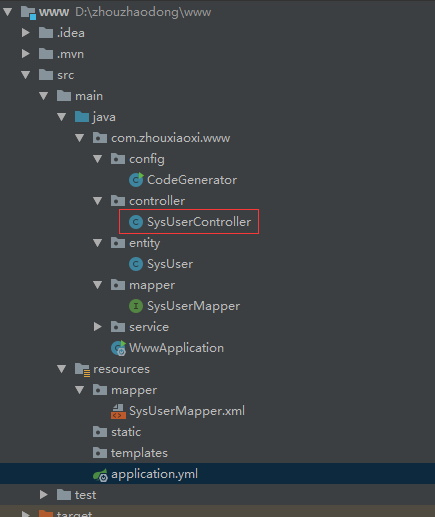
当然还需要在 Spring Boot 启动类中添加 @MapperScan 注解,扫描 Mapper 文件夹:
@SpringBootApplication
@MapperScan("***.*.mapper") //对应你的mapper存放的地址
public class Application {

    public static void main(String[] args) {
        SpringApplication.run(QuickStartApplication.class, args);
    }

}
理论要掌握,实操不能落!以上关于《SpringBoot整合MybatisPlus的简单教程(简单整合)》的详细介绍,大家都掌握了吧!如果想要继续提升自己的能力,那么就来关注golang学习网公众号吧!
声明:本文转载于:SegmentFault 如有侵犯,请联系study_golang@163.com删除
相关阅读
更多>
-
374 收藏
-
499 收藏
-
384 收藏
-
184 收藏
-
265 收藏
最新阅读
更多>
-
139 收藏
-
490 收藏
-
343 收藏
-
392 收藏
-
419 收藏
-
150 收藏
-
438 收藏
-
288 收藏
-
155 收藏
-
440 收藏
-
347 收藏
-
172 收藏
课程推荐
更多>
-

- 前端进阶之JavaScript设计模式
- 设计模式是开发人员在软件开发过程中面临一般问题时的解决方案,代表了最佳的实践。本课程的主打内容包括JS常见设计模式以及具体应用场景,打造一站式知识长龙服务,适合有JS基础的同学学习。
- 立即学习 543次学习
-

- GO语言核心编程课程
- 本课程采用真实案例,全面具体可落地,从理论到实践,一步一步将GO核心编程技术、编程思想、底层实现融会贯通,使学习者贴近时代脉搏,做IT互联网时代的弄潮儿。
- 立即学习 516次学习
-

- 简单聊聊mysql8与网络通信
- 如有问题加微信:Le-studyg;在课程中,我们将首先介绍MySQL8的新特性,包括性能优化、安全增强、新数据类型等,帮助学生快速熟悉MySQL8的最新功能。接着,我们将深入解析MySQL的网络通信机制,包括协议、连接管理、数据传输等,让
- 立即学习 500次学习
-

- JavaScript正则表达式基础与实战
- 在任何一门编程语言中,正则表达式,都是一项重要的知识,它提供了高效的字符串匹配与捕获机制,可以极大的简化程序设计。
- 立即学习 487次学习
-

- 从零制作响应式网站—Grid布局
- 本系列教程将展示从零制作一个假想的网络科技公司官网,分为导航,轮播,关于我们,成功案例,服务流程,团队介绍,数据部分,公司动态,底部信息等内容区块。网站整体采用CSSGrid布局,支持响应式,有流畅过渡和展现动画。
- 立即学习 485次学习
评论列表
-

- 热情的水杯
- 很好,一直没懂这个问题,但其实工作中常常有遇到...不过今天到这,帮助很大,总算是懂了,感谢师傅分享文章内容!
- 2023-06-10 05:50:00
-
- 有魅力的砖头
- 这篇技术文章太及时了,太细致了,真优秀,已加入收藏夹了,关注作者大大了!希望作者大大能多写数据库相关的文章。
- 2023-05-23 03:33:48
-
- 丰富的鲜花
- 很棒,一直没懂这个问题,但其实工作中常常有遇到...不过今天到这,看完之后很有帮助,总算是懂了,感谢作者大大分享技术文章!
- 2023-05-04 13:23:00
-
- 清秀的爆米花
- 很有用,一直没懂这个问题,但其实工作中常常有遇到...不过今天到这,看完之后很有帮助,总算是懂了,感谢博主分享博文!
- 2023-04-25 18:03:23
-
- 结实的乌冬面
- 细节满满,码住,感谢老哥的这篇文章内容,我会继续支持!
- 2023-04-11 13:48:44
-
- 单纯的故事
- 这篇博文真及时,细节满满,很棒,已加入收藏夹了,关注师傅了!希望师傅能多写数据库相关的文章。
- 2023-03-19 11:43:10
-
- 长情的钢笔
- 太全面了,已收藏,感谢师傅的这篇技术文章,我会继续支持!
- 2023-03-17 04:02:03
-
- 懦弱的热狗
- 这篇文章太及时了,很详细,受益颇多,码住,关注博主了!希望博主能多写数据库相关的文章。
- 2023-03-05 20:16:17
-
- 踏实的牛排
- 这篇文章内容出现的刚刚好,楼主加油!
- 2023-03-01 10:26:44
-
- 耍酷的心锁
- 赞 ??,一直没懂这个问题,但其实工作中常常有遇到...不过今天到这,帮助很大,总算是懂了,感谢作者大大分享文章内容!
- 2023-02-01 12:17:12
-
- 甜美的斑马
- 这篇技术贴真及时,很详细,很好,码住,关注师傅了!希望师傅能多写数据库相关的文章。
- 2023-01-30 03:04:34
-
- 单身的路灯
- 太细致了,已加入收藏夹了,感谢师傅的这篇技术贴,我会继续支持!
- 2023-01-27 22:18:08